AI Homepage: Let Claude read the pages you frequent every day and automatically write a new tab dedicated to youAI Homepage:让 Claude 每天读一遍你常逛的网页,自动写一张专属新标签页
Chrome's new tab is probably the most underappreciated screen in the browser: a search box with a row of icons you won't actually click on. AI Homepage does the reverse - it aggregates information for you with a Claude agent: first read your browsing history (most visited domains, visits, page titles), then open the top page in the background with your login, grab the title, post, and link, and finally write a React component as your new tab page. Each time a new tab is opened it is up to date as it is automatically rebuilt in the background for 6/12/24/48 hours. Mit permission to rush to 300 + stars within 12 hours of first submission.
Chrome 的新标签页大概是浏览器里最没被认真对待的一屏:一个搜索框,加一排你其实不会点的图标。AI Homepage 反过来做——它用一个 Claude 智能体替你把信息汇总起来:先读你的浏览历史(最常访问的域名、访问次数、页面标题),再以你的登录态在后台打开其中最靠前的页面,把里面的标题、帖子和链接抓出来,最后写出一个 React 组件作为你的新标签页。每次打开新标签都是最新的,因为它在后台按 6/12/24/48 小时自动重建。MIT 许可,首个提交后 12 小时内冲到 300+ star。
What Problems Does It Solve?它解决什么问题
The pages we open every day are highly repetitive: fixed feeds, fixed backgrounds, fixed articles. But the browser will not aggregate for you, you have to go through it yourself.
RSS and aggregator readers are the answer to the previous generation, at the cost of actively subscribing, maintaining a list of feeds, and they don't read your actual browsing behavior.
The path of AI Homepage is "let the agent read it before you": it reads it for you according to your real browsing habits, and then writes it as a page for you to sweep. You don't need a feed, it will follow your habits.
For those who do cross-border e-commerce, keep an eye on industry dynamics, and chase open source projects, the marginal value of this screen is very high - equivalent to someone turning over what you should watch for you every morning.
我们每天打开的网页其实高度重复:固定的几个信息源、固定的几个后台、固定的几篇文章。但浏览器不会替你汇总,你得自己去翻。
RSS 和聚合阅读器是上一代答案,代价是你要主动去订阅、去维护一份源列表,而且它们不会读你的实际浏览行为。
AI Homepage 的路子是「让智能体比你更早看一遍」:它按你真实的浏览习惯选页面,替你读完,再写成一页给你扫。你不需要配订阅源,它会跟着你的习惯自己变。
对做跨境电商、盯行业动态、追开源项目的人来说,这一屏的边际价值很高——相当于每天早上有人替你把该看的都翻过一遍了。
How it works它是怎么工作的
The extension itself is a standard Chrome MV3 extension (built with WXT + React), and the core loop is in the background worker, so you can close the page after clicking "Build" on the new tab, and the build will continue in the background. Any new tab can see the progress.
It works with a Claude Managed Agents session, which hangs two custom tools for the agent: getHistory returns a sorting summary of your most visited domains, getPageHtml opens up to 8 of them in a background window, and hangs the cleaned HTML as a file in the agent's sandbox.
Inside the sandbox, the agent uses regular grep/read/write to pull titles, posts, and links from these files and write them down as a React component - this is the homepage you see.
There is a key self-restraint in the README: every link on the page must come from a page that the agent has actually read, and it is explicitly asked never to fabricate a URL.
Pages that will be skipped include search engines, web mailboxes, banks, and all marketing pages that are not logged in; pages that cannot be opened by the agent will appear in the progress view and will not be hidden silently.
扩展本身是标准的 Chrome MV3 扩展(用 WXT + React 构建),核心循环放在后台 worker 里,所以你在新标签页点下「Build」之后可以关掉页面,构建会在后台继续,任何一个新标签页都能看到进度。
它用一个 Claude Managed Agents 会话干活,会话里给智能体挂了两个自定义工具:getHistory 返回你访问最多域名的排序摘要,getPageHtml 在后台窗口里打开其中最多 8 个页面、把清理过的 HTML 作为文件挂进智能体的沙箱。
沙箱内部,智能体用常规的 grep / read / write 从这些文件里把标题、帖子和链接扒出来,最后写成一个 React 组件——这就是你看到的首页。
README 里有一条很关键的自我约束:页面上每一个链接都必须来自智能体真正读过的页面,它被明确要求永远不要编造 URL。
会被跳过的页面包括搜索引擎、网页邮箱、银行、以及所有未登录的营销页;智能体打不开的页面会出现在进度视图里,不会静默隐藏。
What the front page looks like is determined by your one sentence首页长什么样,由你一句话决定
There is a free text box in the settings page, and what you write goes into each build and takes precedence over the agent's default behavior. It determines both content and style.
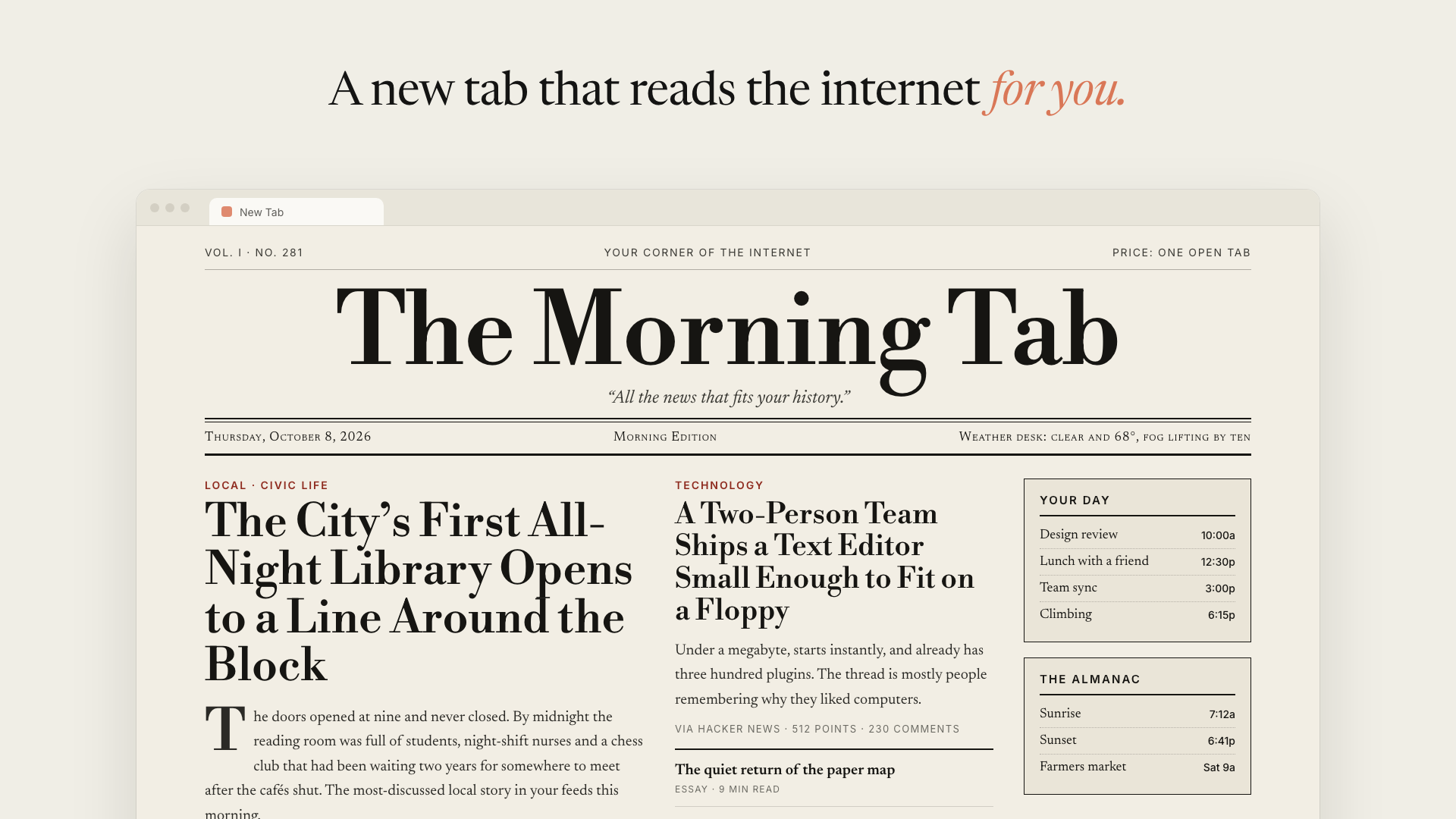
README itself gave five examples: writing "a morning newspaper, serif font, large print headline, a headline plus a column of newsletters" to get a big newspaper front page; writing "a quiet single column, no pictures, five worthy things with a row of reasons" to get a restrained reading list.
Write "dense dashboard: GitHub PR and issue first, then Hacker News, and finally others" to get a working cockpit; write "green black terminal wind, monospace font, like BBS in the 1980s" to get exactly the same thing.
The most practical ones are actually rule-based instructions, such as “Skip sports and politics, always show the weather and my next three schedules” - such fixed demands are faithfully implemented every day.
The model can be selected: the default Claude Sonnet 5.5 (the best balance between quality and cost), Haiku 5.5 is the fastest and most cost-effective, and Opus 5.5 is the most detailed and expensive; the new model will take effect from the next build.
设置页里有一个自由文本框,你写的内容会进入每一次构建,并且优先于智能体的默认行为。它同时决定内容和样式。
README 自己给了五个示例:写「一份晨报,衬线字体、大字报头、一条头条加一栏简讯」得到一份大报头版;写「一个安静的单栏,不要图,五件值得读的事各配一行理由」得到一份克制的阅读清单。
写「密集仪表盘:GitHub 的 PR 和 issue 放最前,然后 Hacker News,最后其他」得到一个工作驾驶舱;写「绿字黑底终端风,等宽字体,像 1980 年代的 BBS」就得到一模一样的那个东西。
最有实用价值的其实是规则型指令,比如「跳过体育和政治,永远显示天气和我接下来的三个日程」——这类固定诉求每天都会忠实执行。
模型可以选:默认 Claude Sonnet 5.5(质量与成本最平衡),Haiku 5.5 最快最省,Opus 5.5 最细致也最贵;新模型从下一次构建开始生效。
Privacy & Cost: Putting Ugly Words First隐私与成本:先把丑话说在前面
This extension requires you to have your own Anthropic API Key. Each build is a real model call, and the cost is determined by the model you choose and the length of the content you read.
To generate the homepage, the extension sends a summary of your browsing history (most visited domains, number of visits, few page titles) and cleaned-up HTML for up to 8 pages to the Anthropic API. These pages are loaded in a browser where you are logged in, so they may contain private content.
Official Note: At the end of each build, the agent session and all uploaded pages are deleted; the API Key is stored locally in the extension.
But the README is also straightforward: anyone with access to this browser profile can read this key. So it's positioned as a “self-use tool” rather than a product for the Chrome Store.
The blocking list is also worth using: the hostname of "agent never reads" can be filled in line by line in the settings page, and the subdomain and * .example.com are supported; the local network addresses (localhost, private IP, .local, and .internal) are always blocked, and pages redirected to the blocked host will be discarded before the content is uploaded.
这个扩展需要你自备 Anthropic API Key,每一次构建都是一次真实的模型调用,费用由你选的模型和读入内容的长度决定。
为了生成首页,扩展会把你的浏览历史摘要(访问最多的域名、访问次数、少量页面标题)以及最多 8 个页面的清理后 HTML 发送给 Anthropic API。这些页面是在你已登录的浏览器里加载的,因此可能包含私密内容。
官方说明:每次构建结束时,智能体会话和所有上传的页面都会被删除;API Key 保存在扩展的本地存储里。
但 README 也直说了:任何能访问这个浏览器配置文件的人都能读到这个 Key。所以它的定位是「自用工具」,而不是适合上架 Chrome 应用商店的产品。
屏蔽列表也值得用起来:设置页里可以逐行填「智能体永不读取」的主机名,支持子域和 *.example.com 通配;本地网络地址(localhost、私有 IP、.local 和 .internal)永远被屏蔽,重定向到屏蔽主机的页面会在内容上传前被丢弃。
Installation Method安装方式
Prerequisites: Chrome or other Chromium core browser, Node.js 20 +, an Anthropic API Key.
After cloning the repository, install the dependencies and build: npx pnpm @ 10.11.1 install and then npx pnpm @ 10.11.1 build (if pnpm is already installed, pnpm install & & pnpm build directly).
Open chrome://extensions, open "Developer Mode" in the upper right corner, click "Load Extracted Extensions", and select the apps/extension/.output/chrome-mv3 directory.
Select “Hold” if Chrome asks if you want to keep the modified new tab.
The first build takes a few minutes: paste the Anthropic API Key in the new tab, click "Build today's homepage", and the progress view will step through the process of preparing the agent, reading the history, opening the page in your browser, analyzing, and writing.
前置条件:Chrome 或其他 Chromium 内核浏览器、Node.js 20+、一个 Anthropic API Key。
克隆仓库后安装依赖并构建:npx pnpm@10.11.1 install 然后 npx pnpm@10.11.1 build(已经装了 pnpm 的话直接 pnpm install && pnpm build)。
打开 chrome://extensions,右上角开启「开发者模式」,点「加载已解压的扩展程序」,选择 apps/extension/.output/chrome-mv3 目录。
如果 Chrome 询问是否保留被修改的新标签页,选「保留」。
首次构建需要几分钟:在新标签页粘贴 Anthropic API Key,点「Build today's homepage」,进度视图会一步步走完准备智能体、读取历史、在你的浏览器里打开页面、分析、写作的过程。
Use reminder使用提醒
This site organizes resources from the GitHub open source repository ThariqS/ai-newtab (mit license), for learning exchanges only. The project will read your browsing history and call your own Anthropic API Key. Please confirm that you accept this data flow before using it. Scenarios involving personal privacy are recommended to try it in the small browser profile first. This article describes the README published by the project. The specific behaviors and commands may change with the update of the version. Please refer to the latest instructions of the repository.
本站整理的资源来自 GitHub 开源仓库 ThariqS/ai-newtab(MIT 许可),仅供学习交流。该项目会读取你的浏览历史并调用你自己的 Anthropic API Key,请在使用前确认你接受这一数据流向;涉及个人隐私敏感的场景建议先在小号浏览器配置文件里试用。文中描述整理自项目公开 README,具体行为与命令可能随版本更新而变化,请以仓库最新说明为准。
⬇ Download · 点击下载:AI Homepage(ai-newtab)源码包(0.33MB)
取自 ThariqS/ai-newtab 主分支源码,MIT 许可,含 MV3 扩展、agent-core 与构建脚本
阅读与点赞数据保存在你的浏览器本地,欢迎留下你的想法。
 今日正能量学一点,用一点;今天种下的种子,会长成明天的能力。去免费下载专区 →广告
评论 文明发言,让讨论更有价值