Graphic tutorial: three commands to turn the entire project into a queryable knowledge graph, agents no longer need to flip the file图文教程:三条命令把整个项目变成可查询的知识图谱,代理再也不用翻文件
Follow along: Install CLI → Register Skills→/graphify. Build the diagram → and ask the question with query/path/explain. No one line of configuration is written throughout the process, and the code parsing is completely run locally.
跟着做一遍:装 CLI → 注册技能 → /graphify . 建图 → 用 query / path / explain 提问。全程不写一行配置,代码解析完全在本地跑。

Step 1: Install the CLI and dependencies第一步:装好 CLI 与依赖
First confirm the Python version: python --version requires more than 3.10. Then install uv, winget install astral-sh.uv for Windows, brew install python @ 3.12 uv for macOS.
Execute uv tool install graphifyy (note the official package name of double y, the command itself is called graphify). After installing, if the command is not found, run uv tool update-shell once and restart the terminal.
You can also use pipx install graphifyy without a uv; the source code package provided in this article can also be installed offline.
先确认 Python 版本:python --version 需要 3.10 以上。然后装 uv,Windows 用 winget install astral-sh.uv,macOS 用 brew install python@3.12 uv。
执行 uv tool install graphifyy(注意是双 y 的官方包名,命令本身叫 graphify)。装完如果提示找不到命令,跑一次 uv tool update-shell 再重开终端。
没有 uv 也可以用 pipx install graphifyy;本文配套的源码包同样能离线安装。
Step 2: Let the assistant know about it第二步:让助手认识它
Execute graphify install in the project directory. It scans what assistant is installed on the machine and automatically writes skills into it. Claude Code, Codex, Cursor, Copilot and more than 20 other platforms are supported.
Just want to load the current warehouse (do not pollute the whole), add --project: the file will fall under .claude/skills/graphify/, you can submit it with the project to your colleagues.
If automatic recognition fails on Windows, explicitly specify: graphify install --platform windows.
在项目目录执行 graphify install。它会扫描本机装了什么助手,自动把技能写进去,Claude Code、Codex、Cursor、Copilot 等 20 多个平台都支持。
只想给当前仓库装(不污染全局),加 --project:文件会落在 .claude/skills/graphify/ 下,可以跟项目一起提交给同事。
Windows 上如果自动识别失败,显式指定:graphify install --platform windows。
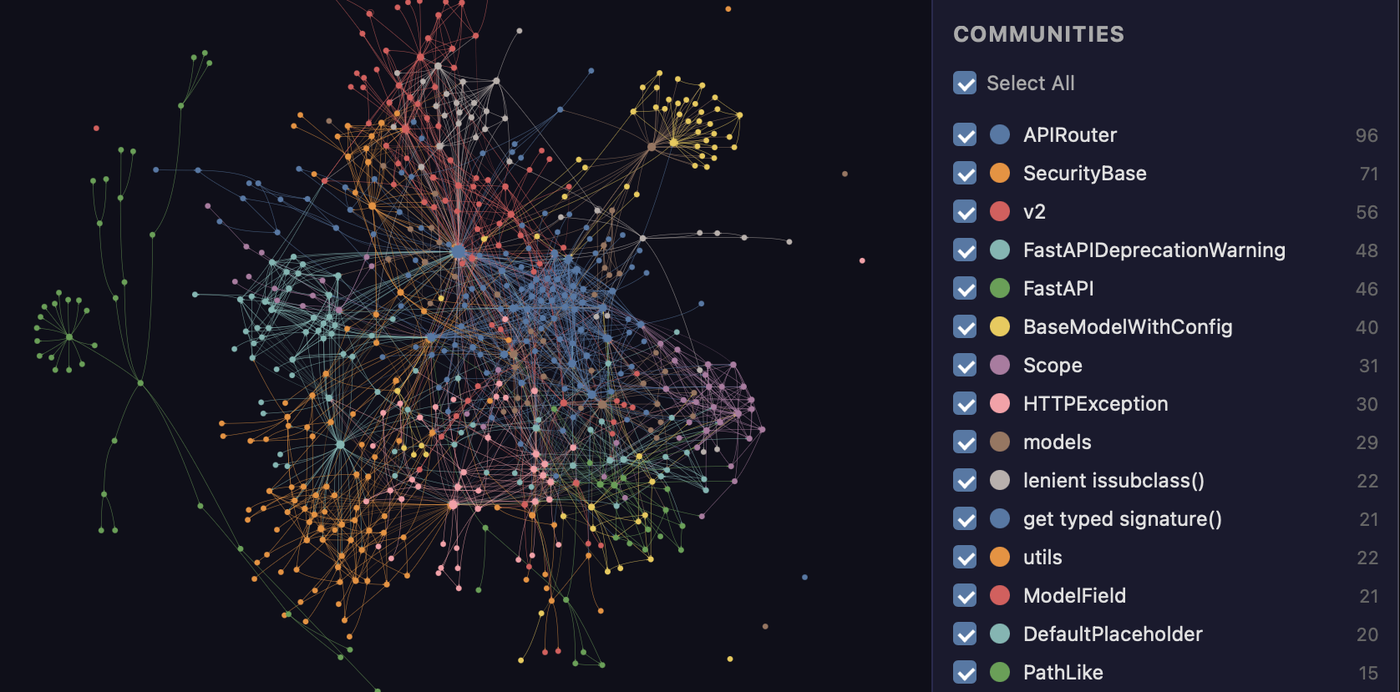
Step 3: Build the drawing and get the three-piece set第三步:建图,拿到三件套
Type/graphify in the assistant session. (A dot indicates the current directory). The first time it will run longer, the code will be parsed by tree-sitter, and the document and PDF will call the model.
After the end, there is more graphify-out/in the directory: open graph.html with a browser, which is an interactive graph. Nodes can be clicked, colored by the community, and can be searched; GRAPH_REPORT.md is the project guide; graph.json is the complete data.
Just want to see the report Do not graph:/graphify. --no-viz; want to generate an extra set of Markdown wiki: add --wiki.
在助手会话里输入 /graphify .(点号表示当前目录)。第一次会跑得久一些,代码走 tree-sitter 解析,文档与 PDF 才会调用模型。
结束后目录里多出 graphify-out/:用浏览器打开 graph.html 就是交互式图谱,节点可点、可按社区上色、可搜索;GRAPH_REPORT.md 是项目导读;graph.json 是完整数据。
只想看报告不要图:/graphify . --no-viz;想额外生成一套 Markdown wiki:加 --wiki。

Step 4: Change to “Chart” instead of “Read Documents”第四步:改成「查图」而不是「读文件」
/graphify query "How is authentication connected to the database?" A subgraph with a limited range is returned, the proxy reads only these contents, and the token consumption comes down immediately.
/graphify path "UserService" "DatabasePool" Prints the shortest path between two concepts, with each hop annotating the relationship type and extracted/inferred confidence.
/graphify explain "RateLimiter" gives the source file of a single concept, the line number, the community it belongs to, and connects to all, and it is particularly fast to check "who is using this class".
/graphify query "认证是怎么连到数据库的?" 会返回一个范围受限的子图,代理只读这些内容,token 消耗立刻下来。
/graphify path "UserService" "DatabasePool" 打印两个概念之间的最短路径,每一跳都标注关系类型和 EXTRACTED / INFERRED 置信度。
/graphify explain "RateLimiter" 给出单个概念的来源文件、行号、所属社区与全部连接,排查「这个类到底谁在用」特别快。
Step 5: Keep it fresh on its own第五步:让它自己保持新鲜
Execute graphify hook install to install the git hook, and then incrementally rebuild the atlas every time you commit and cut branches, without having to manually remember to run.
Changed the file to synchronize manually:/graphify. --update only redo parsing the changed part; clustering parameters are not satisfied with --cluster-only --resolution 1.5 rerun community division, no need to redo parsing.
The map only falls in the project directory by default, and both git hook and CI can read it; when the team collaborates, they submit graph.json together, and the newcomer can pull it down and check it directly.
执行 graphify hook install 装上 git 钩子,之后每次提交和切分支都会增量重建图谱,不用手动记着跑。
改了文件想手动同步:/graphify . --update 只重解析变更部分;聚类参数不满意用 --cluster-only --resolution 1.5 重跑社区划分,不必重新解析。
图谱默认只落在项目目录里,git hook 与 CI 都能读;团队协作时把 graph.json 一起提交,新人拉下来就能直接查。
Use reminder使用提醒
This article is compiled from public sources and ships with the matching resource. Product features and pricing are subject to the official page. Resources are for learning and exchange only — please respect the original license.
本文整理自公开资料并附上配套资源;涉及产品的功能与价格以官方页面为准。资源仅供学习交流,请遵循来源许可。
⬇ Download · 点击下载:教程配套:Graphify v0.9.94 源码包(2.79MB)
PyPI 官方 sdist,离线安装用 pip install ./graphifyy-0.9.94.tar.gz;Apache-2.0,可自由改造。
阅读与点赞数据保存在你的浏览器本地,欢迎留下你的想法。
 今日正能量学一点,用一点;今天种下的种子,会长成明天的能力。去免费下载专区 →广告
评论 文明发言,让讨论更有价值