Tutorial: Give your agent long-term memory in four steps (self-hosted Hindsight)教程:四步给智能体接上长期记忆(自建 Hindsight)
Four steps end to end: start the memory service with Docker, create a memory bank and retain your first fact, plug the MCP endpoint into Claude Code, then verify that recall survives a new session. Everything runs locally, so your data never leaves the machine.
四步跑通:Docker 起记忆服务、建一个记忆库并写入第一条记忆、把 MCP 端点接进 Claude Code、最后验证跨会话是否真的记住了。全程本机运行,数据不出机器。
Step 1: Start the memory service with Docker第一步:用 Docker 把记忆服务跑起来
First make sure Docker is available and then execute: docker run -it --name hindsight --restart unless-stopped -p 8888: 8888 -p 9999: 9999 -e hindsight_API_LLM_API_key = $ OPENAI_API_key -v hindsight-data:/home/hindsight/.pg0 ghcr.io/vectorize-io/hindsight: latest.
8888 is the rest and MCP port, 9999 is the console port, the data volume .pg0 hangs the built-in PostgreSQL, and the container restart memory will not be lost. --restart unless-stopped Guarantee boot.
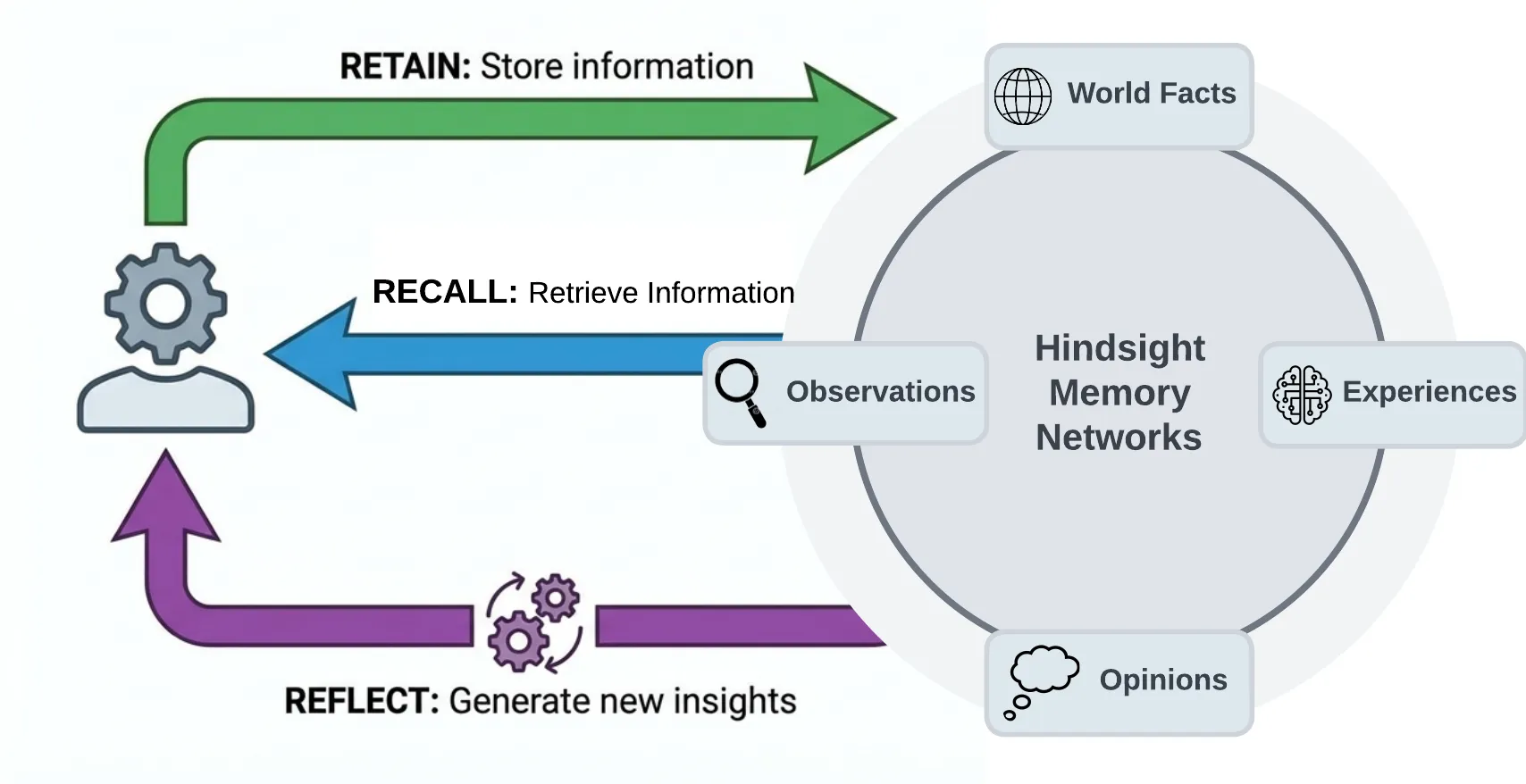
I don't want to use Docker to pip install hindsight-api in the Python environment, set hindsight_API_LLM_provider and key to run hindsight-api, and listen to 8888 by default. The picture is a schematic diagram of its memory link.
先确认 Docker 可用,然后执行:docker run -it --name hindsight --restart unless-stopped -p 8888:8888 -p 9999:9999 -e HINDSIGHT_API_LLM_API_KEY=$OPENAI_API_KEY -v hindsight-data:/home/hindsight/.pg0 ghcr.io/vectorize-io/hindsight:latest。
8888 是 REST 与 MCP 端口,9999 是控制台端口,数据卷 .pg0 挂的是内置 PostgreSQL,容器重启记忆也不会丢。--restart unless-stopped 保证开机自启。
不想用 Docker 就在 Python 环境里 pip install hindsight-api,设好 HINDSIGHT_API_LLM_PROVIDER 与 KEY 后运行 hindsight-api,默认同样监听 8888,配图即它的记忆链路示意图。
Step 2: Create a memory bank, retain and recall第二步:建记忆库,写入并召回第一条记忆
Having a separate memory bank for each use is the easiest thing to do (one assistant, one library). When building the library, fill in the name and a background description, this background will participate in the follow-up judgment as its self-perception.
Write with retain, throw in the fact that "the user prefers to use Python for data science projects"; query with recall, ask "what programming language the user prefers" to see if it can be retrieved; use reflect when it is needed, such as "This machine learning project should recommend Python or R" - it will give a tendency judgment based on accumulated memory, rather than paraphrasing the original text.
You can try three lines of code on the Python side: from hindsight_api import MemoryEngine, await memory.initialize (), and then call create_memory_bank/retain/recall in turn.
给每个用途单独建一个 memory bank 是最省心的做法(一个助手一个库)。建库时填 name 和一个 background 描述,这个 background 会作为它的自我认知参与后续判断。
写入用 retain,把「用户偏好用 Python 做数据科学项目」这类事实丢进去;查询用 recall,问「用户偏好什么编程语言」看它能不能取回来;需要它拿主意时用 reflect,比如「这个机器学习项目该推荐 Python 还是 R」——它会基于积累的记忆给出带倾向的判断,而不是复述原文。
Python 侧三行代码就能试:from hindsight_api import MemoryEngine,await memory.initialize(),然后依次调 create_memory_bank / retain / recall。
Step 3: Plug the MCP endpoint into your agent第三步:把 MCP 端点接进你的智能体
The MCP address that comes with the service is http://localhost: 8888/mcp/{bank_id}/. Replace {bank_id} with the ID of the library you just built, and retain, recall, and reflect will become three callable tools directly. Any MCP-compatible client can hang up.
Programming agents have a more convenient connection method: npx @ vectorize-io/hindsight-coding-agents install claude-code is only connected to Claude Code, and install all automatically detects that all the agents of the machine are connected one by one.
If you don't want to reside in the service, the official also offers the stdio version of hindsight-local-mcp, which is suitable for temporarily pulling up the memory ability only when needed.
服务自带的 MCP 地址是 http://localhost:8888/mcp/{bank_id}/,把 {bank_id} 换成你刚建的库 ID,retain、recall、reflect 就直接变成三个可调用工具,任何兼容 MCP 的客户端都能挂上。
编程智能体有更省事的接法:npx @vectorize-io/hindsight-coding-agents install claude-code 只接 Claude Code,install all 则自动检测本机所有智能体逐个接好。
不想常驻服务的话,官方还提供 stdio 版 hindsight-local-mcp,适合只在需要时临时拉起记忆能力。
Step 4: Verify cross-session recall, then decide where inference runs第四步:验证跨会话生效,再决定模型归属
The verification method is very straightforward: say a preference in session A (for example, "This project uses pnpm, do not use npm"), close the session, open a new session B and ask "What package manager does this project use" directly, if you can answer correctly, it means that the memory link is connected.
The second step is to change the model: change the hindsight_API_LLM_provider to ollama or lmstudio, and run it with the local model to be completely offline - memory and reasoning are on your own machine, and sensitive items are especially suitable.
Last reminder: The memory system will write the conversation into the database and send it to the model you configured. Please confirm the compliance boundaries before accessing the company's internal data.
验证方法很直接:在会话 A 里说一条偏好(比如「这个项目统一用 pnpm,不要用 npm」),关掉会话,开新会话 B 直接问「这个项目用什么包管理器」,能答对就说明记忆链路通了。
第二步是换模型:把 HINDSIGHT_API_LLM_PROVIDER 改成 ollama 或 lmstudio,配本地模型跑,就能做到完全离线——记忆和推理都在你自己机器上,敏感项目尤其适合。
最后提醒一句:记忆系统会把对话内容写进数据库并送往你配置的模型,公司内部资料接入前请先确认合规边界。
Notes使用提醒
This article is compiled from public sources and ships with the matching resource. Product features and pricing are subject to the official page. Resources are for learning and exchange only — please respect the original license.
本文整理自公开资料并附上配套资源;涉及产品的功能与价格以官方页面为准。资源仅供学习交流,请遵循来源许可。
⬇ Download · 点击下载:Hindsight API v0.10.2 官方 PyPI 源码包(约 1.77 MB)
配合本教程自建记忆服务使用,对应 v0.10.2 release
阅读与点赞数据保存在你的浏览器本地,欢迎留下你的想法。
 今日正能量学一点,用一点;今天种下的种子,会长成明天的能力。去免费下载专区 →广告
评论 文明发言,让讨论更有价值