Graphics Tutorial: Installing MCP for ChatGPT/DeepSeek Web, from plugin to first local tool图文教程:给 ChatGPT / DeepSeek 网页版装上 MCP,从装插件到跑通第一个本地工具
This tutorial will help you turn the web-based AI you use every day into a working assistant: first build the MCP SuperAssistant extension with the source code, then start an MCP service locally, and finally go back to the ChatGPT web version and click the button to let the AI actually read the file on your machine. No API Key is required throughout, and no AI platform settings need to be changed.
这篇教程带你把自己天天在用的网页版 AI 变成能真正干活的助手:先用源码构建 MCP SuperAssistant 扩展,再在本地起一个 MCP 服务,最后回到 ChatGPT 网页版里点一下按钮,让 AI 真的读到你本机上的文件。全程不需要 API Key,也不需要改任何 AI 平台设置。
Step 1: Prepare the environment第一步:准备环境
Install Node.js 20 or later and execute node -v in the terminal to confirm that the version number can be output normally.
Install pnpm as a package manager (execute npm i -g pnpm), and subsequent repositories rely on it for faster loading.
Prepare a Chromium kernel browser (either Chrome or Edge) and load the extension in developer mode.
The machine also needs a working MCP service, choose an official sample server, run through the link before replacing it with its own business service.
安装 Node.js 20 或更高版本,并在终端执行 node -v 确认版本号能正常输出。
安装 pnpm 作为包管理器(执行 npm i -g pnpm),后续仓库依赖用它装更快。
准备一个 Chromium 内核浏览器(Chrome 或 Edge 均可),后面要用开发者模式加载扩展。
本机还需要一个可运行的 MCP 服务,任选一个官方示例服务器即可,先跑通链路再替换成自己的业务服务。
Step 2: Get the extension code and build第二步:取得扩展代码并构建
Download the MCP SuperAssistant source code package (about 3.2 MB) from the "AI Plugins" section of this site and extract it to the working directory, for example, D:\projects\mcp-superassistant.
Execute pnpm install installation all dependencies in the repository root directory; this is the pnpm workspace project, the root directory can override the sub-package in one installation.
Enter the chrome-extension directory, execute the build command, and wait for the terminal output to be packaged.
Write down the path of the product directory (usually the chrome-mv3 directory under .output), and select it in the next step.
If the installation is stuck, you can execute npm config set registry https://registry.npmmirror.com to replace it with a domestic image and try again.
从本站「AI插件」栏目下载 MCP SuperAssistant 源码包(约 3.2 MB),解压到工作目录,例如 D:\projects\mcp-superassistant。
在仓库根目录执行 pnpm install 安装全部依赖;这是 pnpm workspace 工程,根目录一次安装即可覆盖子包。
进入 chrome-extension 目录,执行构建命令,等待终端输出打包完成。
记下产物目录路径(通常在 .output 下面的 chrome-mv3 目录),下一步要选它。
如果依赖安装卡住,可先执行 npm config set registry https://registry.npmmirror.com 换成国内镜像再重试。
Step 3: Load the extension into your browser第三步:把扩展装进浏览器
Type chrome://extensions in the address bar to open the extension management page and open the "Developer Mode" switch in the upper right corner.
Click "Load Unzipped Extensions" in the upper left corner and select the product catalog recorded in the second step.
After the toolbar loads successfully, an extended icon will appear; if you don't see it, tap the puzzle icon on the right side of the address bar to pin it to the toolbar.
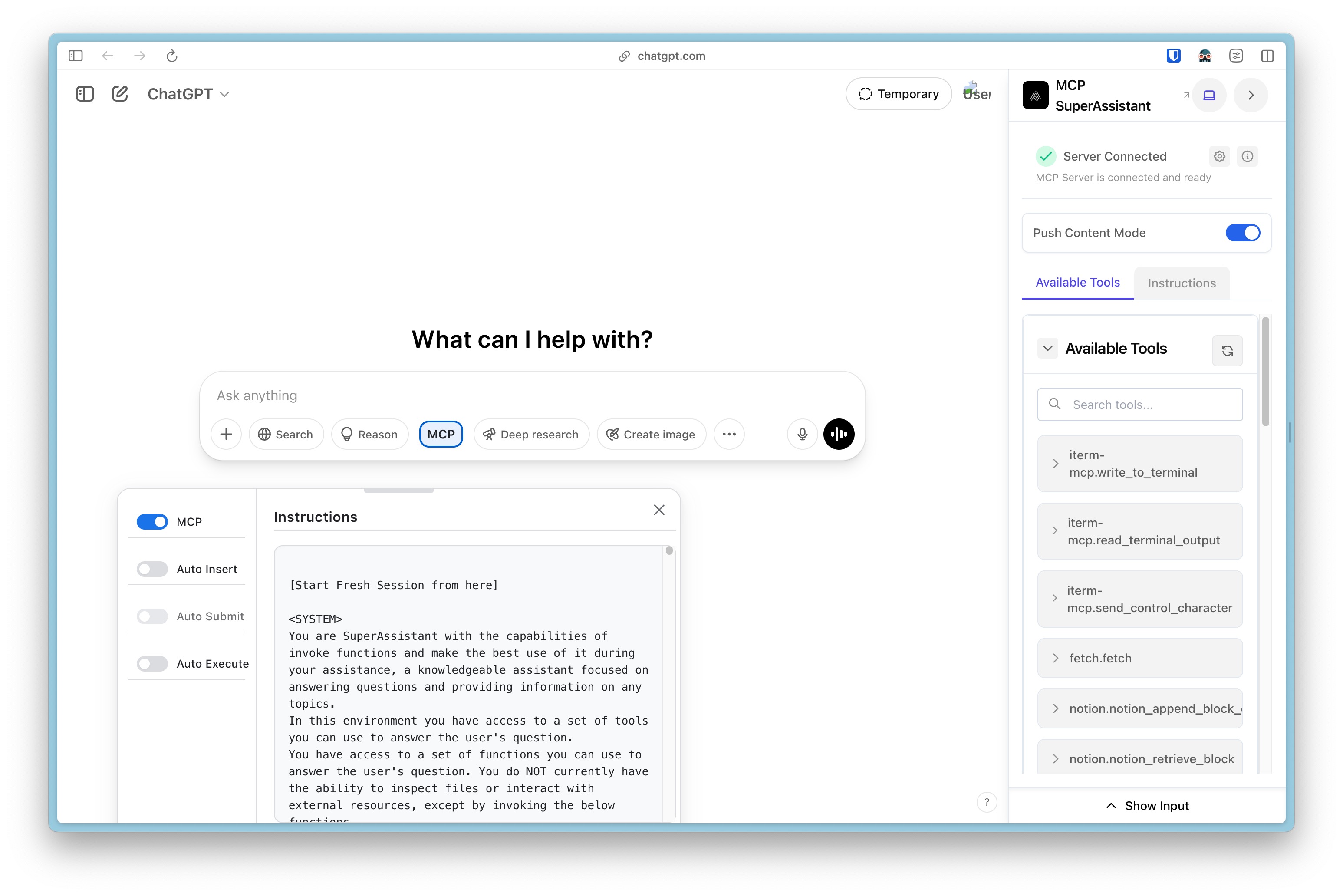
Open the extension panel, fill in your MCP service address (usually a native HTTP or SSE endpoint), and save the settings.
在地址栏输入 chrome://extensions 打开扩展管理页,打开右上角的「开发者模式」开关。
点击左上角「加载已解压的扩展程序」,选择第二步记下的产物目录。
加载成功后工具栏会出现扩展图标;如果没看到,点一下地址栏右侧的拼图图标,把它固定到工具栏。
点开扩展面板,填入你的 MCP 服务地址(本机通常是 HTTP 或 SSE 端点),保存设置。
Step 4: Run through the first call in ChatGPT on the web第四步:在 ChatGPT 网页版里跑通第一次调用
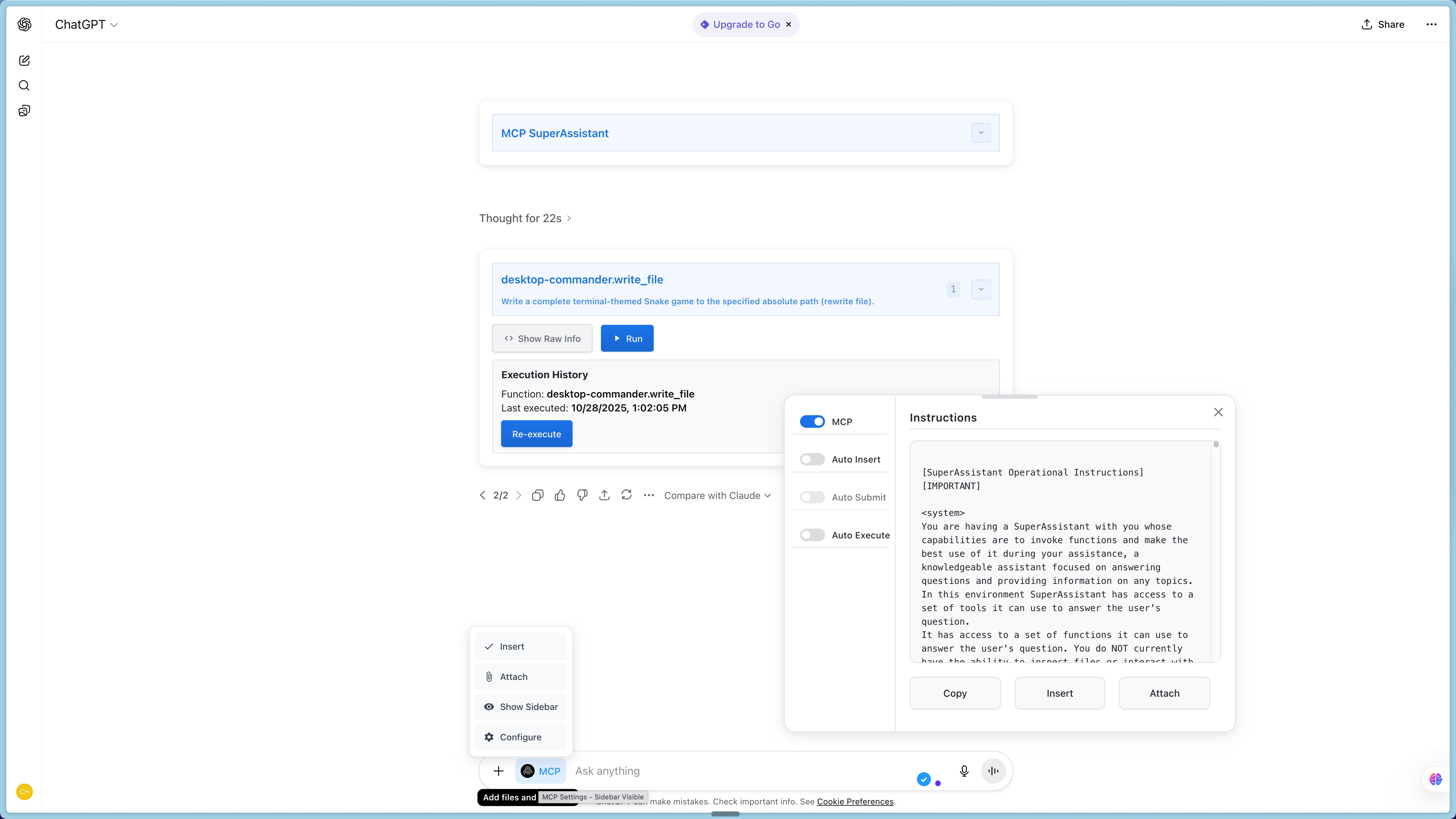
Open the web version of ChatGPT or DeepSeek and log in, refresh the page once for the content script injection to take effect.
Describe the need in natural language in the conversation, for example by asking it to “list the files in my native project directory.”
If the model returns a tool call format, a clickable execution block automatically appears on the page.
Tap the execution block, and the extension will call the native MCP service to retrieve the real results.
The results are automatically inserted into the dialog box, and the model continues to answer based on the real data - you have completed the first step of the web version of the AI and the local program.
FAQ: If the page does not show an execution block, first confirm that the MCP service process is still alive, and then refresh the page to try again.
打开 ChatGPT 或 DeepSeek 的网页版并登录,刷新一次页面让内容脚本注入生效。
在对话里用自然语言描述需求,例如让它「列出我本机项目目录下的文件」。
如果模型返回了工具调用格式,页面上会自动出现一个可点击的执行块。
点一下执行块,扩展会调用本机 MCP 服务,把真实结果取回来。
结果会自动插入对话框,模型接着基于真实数据继续回答——这时你已经完成了网页版 AI 与本地程序的第一步打通。
常见问题:如果页面没有出现执行块,先确认 MCP 服务进程还活着,再刷新页面重试一次。
Step 5: Replace the link with your own tool第五步:把链路换成你自己的工具
Register your own tools (such as checking the database, reading the internal interface, retrieving documents) on the MCP server, refresh the page after restarting the service, and the extension will pull the list of tools again.
First, access the read-only tool, confirm that the model call intention and parameters are in line with expectations, and then gradually open the write operation.
When opening multiple AI web pages at the same time, you can hang different service combinations for them to separate the permissions of "viewing data" and "changing data".
在 MCP 服务端注册自己的工具(比如查数据库、读内部接口、检索文档),重启服务后刷新页面,扩展会重新拉取工具列表。
先从只读工具开始接入,确认模型调用意图与参数都符合预期,再逐步开放写操作。
同时开多个 AI 网页时,可以给它们挂不同的服务组合,把「查资料」和「改数据」的权限分开。
Use reminder使用提醒
The accompanying resource for this tutorial is the MCP SuperAssistant extension source code package, see the "AI Plugins" section of this site. Executing the MCP tool is equivalent to authorizing the model to operate your native resources, please verify it in the test environment first; the conversation content will still be sent to the selected large model service provider, and sensitive pages should be used with caution. This article is compiled from self-disclosed materials, and the resources are for learning and communication only. Please follow the project mit permission.
本教程配套资源为 MCP SuperAssistant 扩展源码包,见本站「AI插件」栏目。执行 MCP 工具相当于授权模型操作你的本机资源,请先在测试环境验证;对话内容仍会发送给你所选的大模型服务商,敏感页面谨慎使用。本文整理自公开资料,资源仅供学习交流,请遵循项目 MIT 许可。
⬇ Download · 点击下载:MCP SuperAssistant 扩展完整源码包(约 3.2 MB)
教程配套资源,来自 GitHub 开源仓库 srbhptl39/MCP-SuperAssistant 官方快照(MIT 许可),需用 pnpm 构建后以开发者模式加载
阅读与点赞数据保存在你的浏览器本地,欢迎留下你的想法。
 今日正能量学一点,用一点;今天种下的种子,会长成明天的能力。去免费下载专区 →广告
评论 文明发言,让讨论更有价值