MCP SuperAssistant browser plugin: let ChatGPT, Gemini, DeepSeek web directly call MCP tools (mit open source)MCP SuperAssistant 浏览器插件:让 ChatGPT、Gemini、DeepSeek 网页版直接调用 MCP 工具(MIT 开源)
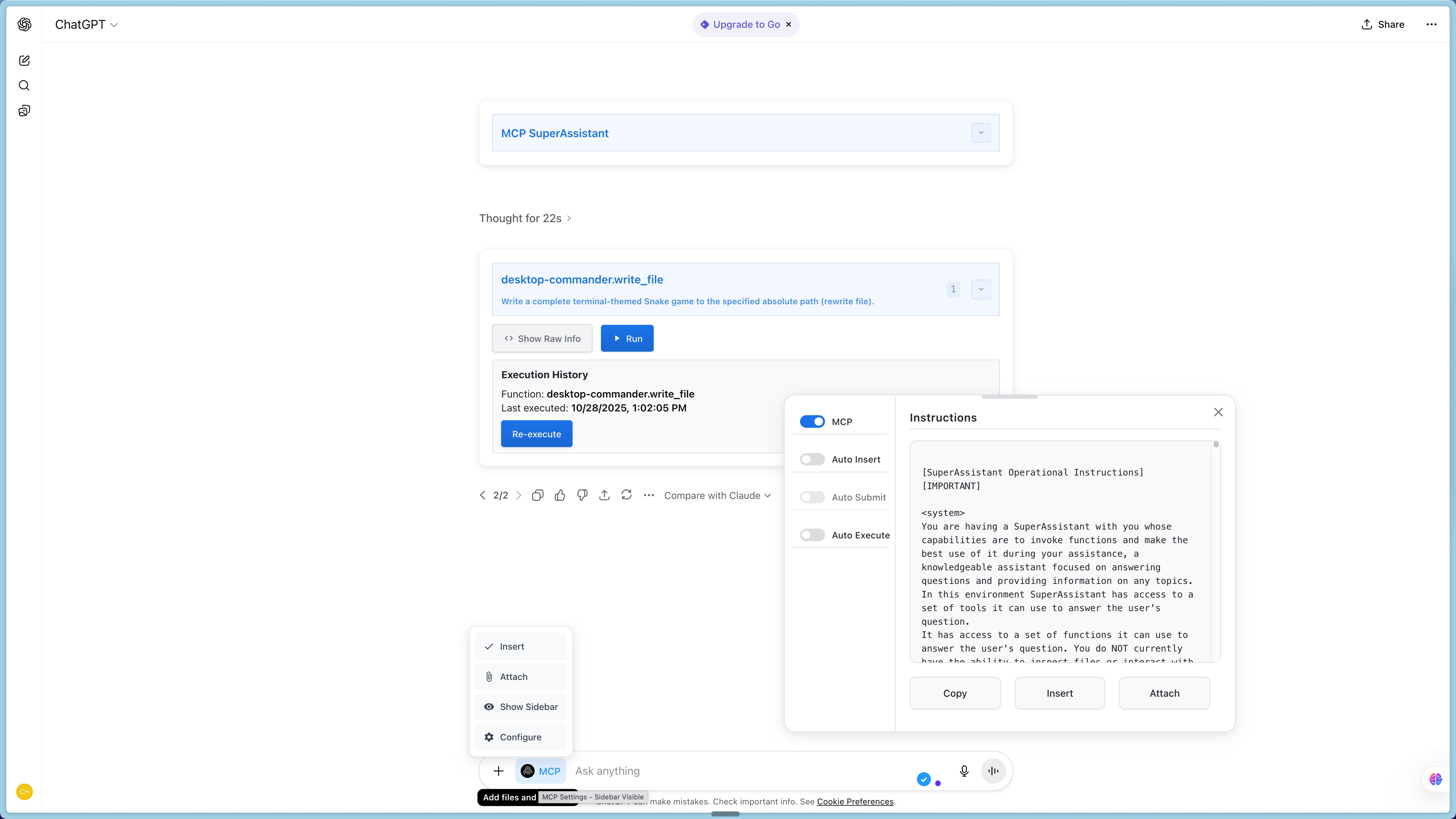
AI on the web has always had a hard time - only chatting, not touching your local files, databases, and business systems. MCP SuperAssistant uses a lightweight Chrome extension to cram the Model Context Protocol into more than a dozen mainstream webpages such as ChatGPT, Gemini, DeepSeek, Kimi, Grok, Perplexity, etc.: The tool call that appears in the AI answer will be automatically recognized as a one-click execution button, and the native MCP service will actually run through it with one click, and the result will be automatically backfilled into the conversation. Mit is open source, front-end-only, and does not transit through any cloud.
网页版 AI 一直有个硬伤——只能聊天,碰不到你的本地文件、数据库和业务系统。MCP SuperAssistant 用一个轻量的 Chrome 扩展把 Model Context Protocol 塞进 ChatGPT、Gemini、DeepSeek、Kimi、Grok、Perplexity 等十几个主流网页端:AI 回答里出现的工具调用会被自动识别成一键执行的按钮,点一下就由本机 MCP 服务真正跑完,结果自动回填进对话。MIT 开源、纯前端、不经任何云端中转。
What Problems Does It Solve?它解决什么问题
The biggest weakness of the web version of AI is "not enough": the model is no longer smart, and it can't read your local code repository, check your database, and tune your company's internal interfaces.
MCP (Model Context Protocol) was originally an open protocol to solve this problem, but the client mainly falls on the desktop and the IDE, and there has been a lack of a common bridge layer in the browser.
This extension makes the bridge a “visible button”: when the AI writes a tool call in the answer, the page renders it as a clickable execution block, without having to manually copy the parameter and paste it on the command line.
Typical scenarios: let ChatGPT web directly read your PR on GitHub, let Gemini check the local SQLite, and let DeepSeek call your own knowledge base retrieval, all in a conversation stream.
网页版 AI 的最大短板是「够不着」:模型再聪明,也没法读你本地的代码仓库、查你的数据库、调你公司的内部接口。
MCP(Model Context Protocol)本来是解决这个问题的开放协议,但客户端主要落在桌面端与 IDE 里,浏览器里一直缺一个通用的桥接层。
这个扩展把桥接做成了「看得见的按钮」:当 AI 在回答里写出工具调用时,页面会把它渲染成一个可点击的执行块,不必手动复制参数再去命令行粘贴。
典型场景:让 ChatGPT 网页版直接读你 GitHub 上的 PR、让 Gemini 查本地 SQLite、让 DeepSeek 调用你自建的知识库检索,全部在对话流里一次完成。
Which platforms are supported支持哪些平台
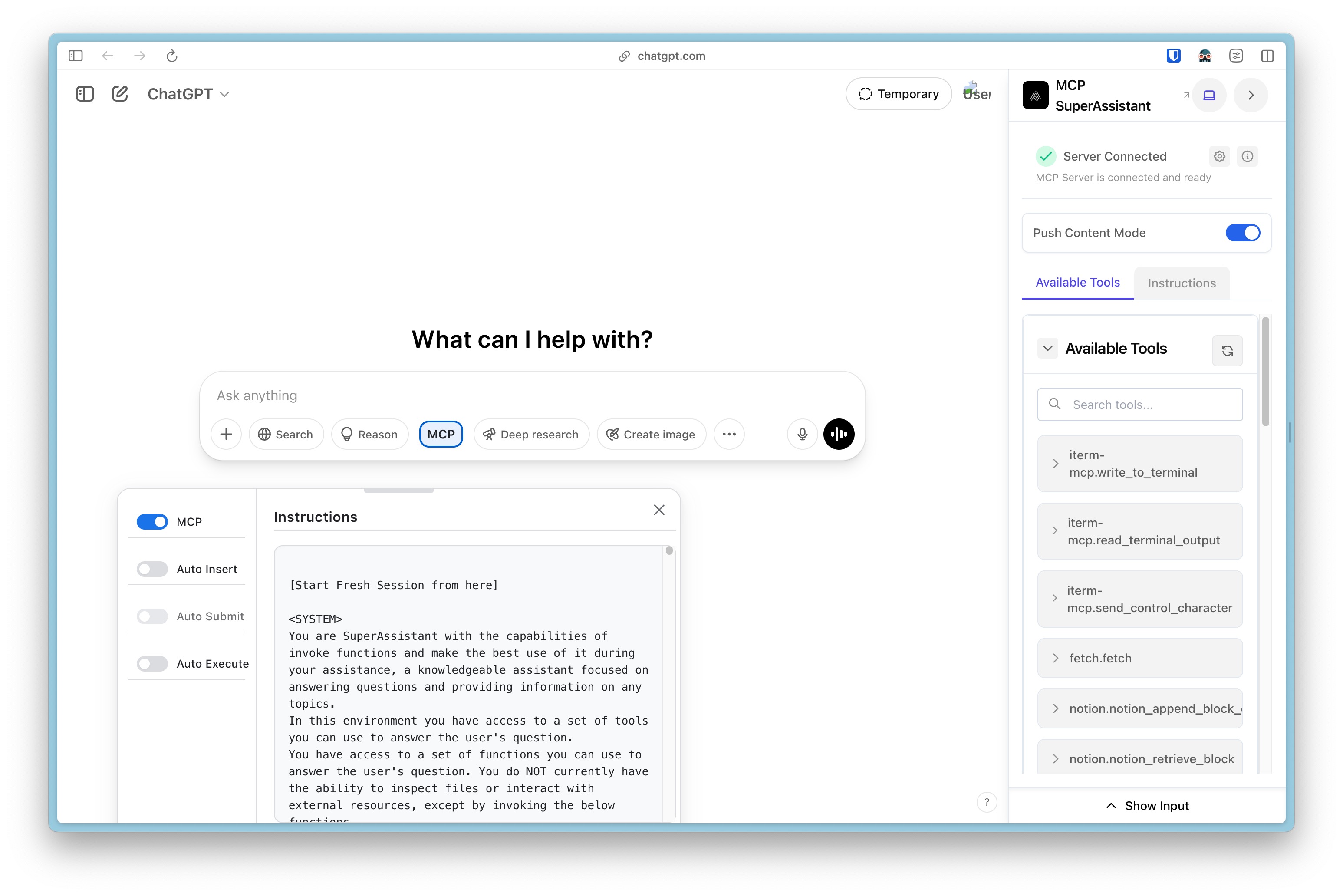
ChatGPT, Google Gemini, Google AI Studio, Perplexity, Grok, DeepSeek, Kimi, Qwen Chat, Z Chat, GitHub Copilot, Mistral AI, OpenRouter Chat, T3 Chat, and more.
It is injected into the page through content scripts and does not rely on various official plug-in interfaces, so the usability is less affected when the platform is revised or the API policy is changed.
Chrome, Edge and other Chromium core browsers can be installed; the official Chrome Store and Firefox Add-ons are also available, or you can build your own.
已适配 ChatGPT、Google Gemini、Google AI Studio、Perplexity、Grok、DeepSeek、Kimi、Qwen Chat、Z Chat、GitHub Copilot、Mistral AI、OpenRouter Chat、T3 Chat 等十余个网页端。
它通过内容脚本注入到页面,不依赖各家官方插件接口,所以平台改版或 API 政策变动时,可用性受影响更小。
Chrome、Edge 等 Chromium 内核浏览器都能装;官方同时上架了 Chrome 应用商店与 Firefox Add-ons,也可以自行构建。
Core Ability核心能力
Automatic tool recognition: Scan the MCP tool call format in the AI response and highlight it directly on the page.
One-click execution: Click the execution block to call the native MCP service, no need to switch windows or manually spell commands.
Result backfill: The execution result is automatically inserted into the dialog box, and the AI can continue to reason down based on the real data.
Multi-platform parallelism: ChatGPT and Gemini are turned on at the same time, and different MCP server combinations can be mounted on both sides.
工具自动识别:扫描 AI 回复里的 MCP 工具调用格式,直接在页面上高亮标出。
一键执行:点击执行块即调用本机 MCP 服务,不需要切换窗口或手动拼命令。
结果回填:执行结果自动插入对话框,AI 可以基于真实数据继续往下推理。
多平台并行:同时开着 ChatGPT 与 Gemini,两边可以挂载不同的 MCP 服务器组合。
Download and Installation Instructions下载与安装说明
The following is the complete source code package of the project's official repository. The chrome-extension directory in the compressed package is the extension ontology. The repository is managed by pnpm workspace, and you need to build a loadable product directory yourself.
The most convenient way is to search for MCP SuperAssistant one-click installation directly in the Chrome App Store; if you want to change the code, or use a submission that is newer than the store, take the source code route.
Source code building process: Install Node.js 20 and above with pnpm, execute pnpm install in the repository root directory, then enter the chrome-extension directory to execute the build command, and the product will be output to the mv3 directory under .output.
Open chrome://extensions, enable "Developer Mode" in the upper right corner, click "Load Extracted Extensions" and select the output directory in the previous step.
After installing the point extension icon, fill in the MCP service address (native HTTP or SSE endpoint), refresh the AI web page, and the tool execution panel will appear on the page.
下面提供的是项目官方仓库的完整源码包,压缩包内的 chrome-extension 目录就是扩展本体;仓库用 pnpm workspace 管理,需要自行构建出可加载的产物目录。
最省事的方式是直接在 Chrome 应用商店搜索 MCP SuperAssistant 一键安装;想改代码、或用比商店更新的提交,再走源码路线。
源码构建流程:安装 Node.js 20 以上与 pnpm,在仓库根目录执行 pnpm install,再进入 chrome-extension 目录执行构建命令,产物会输出到 .output 下的 mv3 目录。
打开 chrome://extensions,启用右上角「开发者模式」,点「加载已解压的扩展程序」选择上一步的输出目录即可。
装好后点扩展图标填入 MCP 服务地址(本机 HTTP 或 SSE 端点),刷新一次 AI 网页,页面上就会出现工具执行面板。
Use reminder使用提醒
The extension itself does not upload data, but the conversations on the AI web will still be sent to the large model service provider of your choice. If the page involves sensitive information such as accounts and keys, please be careful to let the AI read it. Executing the MCP tool is equivalent to letting the model operate your native resources indirectly. It is recommended to first test the water with a read-only tool, confirm the behavior, and then release the write permission. This article is compiled from self-disclosed materials, and the resources are for learning and communication only. Please follow the project mit permission.
扩展本身不上传数据,但 AI 网页端的对话内容仍会发送给你所选的大模型服务商;页面若涉及账号、密钥等敏感信息,请谨慎让 AI 读取。执行 MCP 工具相当于让模型间接操作你的本机资源,建议先用只读类工具试水,确认行为后再放开写权限。本文整理自公开资料,资源仅供学习交流,请遵循项目 MIT 许可。
⬇ Download · 点击下载:MCP SuperAssistant 扩展完整源码包(约 3.2 MB)
来自 GitHub 开源仓库 srbhptl39/MCP-SuperAssistant 官方仓库快照(MIT 许可),含 chrome-extension 扩展源码与完整文档,需用 pnpm 构建后加载
阅读与点赞数据保存在你的浏览器本地,欢迎留下你的想法。
 今日正能量学一点,用一点;今天种下的种子,会长成明天的能力。去免费下载专区 →广告
评论 文明发言,让讨论更有价值