NVIDIA OpenShell v0.1.2: Give the agent a "locked room", the official Linux version is about 9.96 MBNVIDIA OpenShell v0.1.2:给智能体一间「上锁的房间」,官方 Linux 版约 9.96MB
When Nvidia's open source agents are running safely, GitHub's hot list is the first echelon on the day. It solves a very real problem: the more capable the agent is, the more it needs to read files, load dependencies, call APIs, use credentials - and these permissions are difficult to take back once they are released. OpenShell allows agents to retain these capabilities without giving them unlimited access to your data, keys, and network.
英伟达开源的智能体安全运行时,当天 GitHub 热榜第一梯队。它要解决的是一个很现实的问题:智能体越能干,就越需要读文件、装依赖、调 API、用凭据——而这些权限一旦放开就很难收回。OpenShell 让智能体保有这些能力,同时不给它对你数据、密钥和网络的无限访问权。
Its two lines of defense, one in the kernel and one in mathematics它的两条防线,一条在内核,一条在数学上
The first is kernel-level enforcement. Each agent runs in a separate sandbox, the kernel controls which files it can access, which system calls it can make, and each network connection goes through a policy check before leaving the sandbox. The agent never sees the real credentials - OpenShell only annotates the credentials on requests to approved endpoints.
The second is formal verification. When the policy is to be changed, it first uses a formal method to calculate which permissions will be "new" for this change - such as being able to access a new host with credentials and calling a new API method - and marks these risk points for human review. This is the biggest difference between it and the ordinary container isolation scheme: instead of waiting for something to happen, it tells you what it will allow before the strategy takes effect.
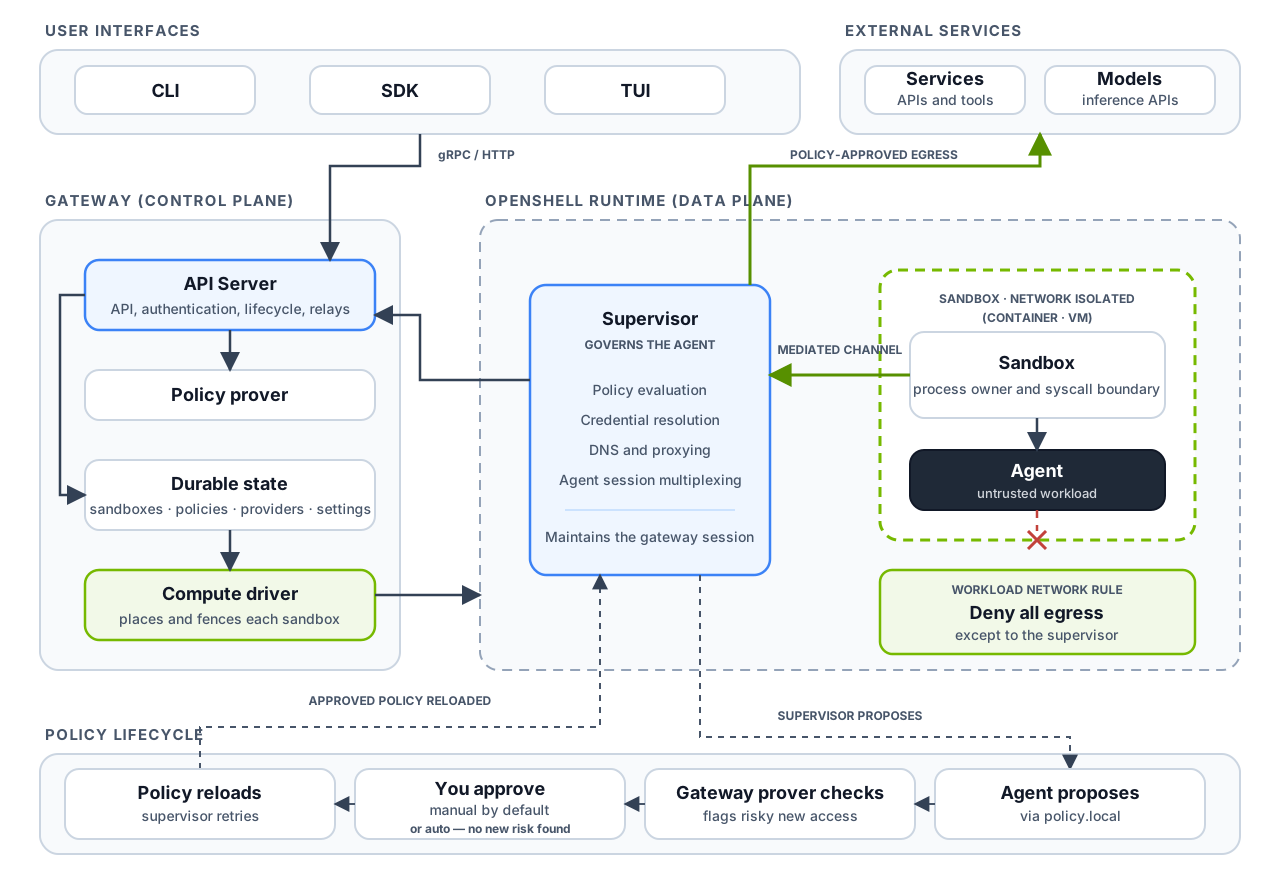
The diagram shows the system architecture diagram (docs/images/openshell-system-architecture.svg) in the official warehouse: the user interface is connected to the gateway, and the gateway uses a prover to verify policy changes; at runtime, the trusted supervisor is separated from the network-isolated sandbox load, and the only external path of the load is the intermediated connection.
第一条是内核级强制。每个智能体跑在独立的沙箱里,内核控制它能访问哪些文件、能发起哪些系统调用,每一条网络连接在离开沙箱前都要过一遍策略检查。智能体始终看不到真实凭据——OpenShell 只在发往已批准端点的请求上加注凭据。
第二条是形式化验证。策略要变更时,它先用形式化方法算出这次变更会「新开出」哪些权限——比如能带凭据访问一个新的主机、能调用一个新的 API 方法——把这些风险点标出来交给人审。这一条是它跟普通容器隔离方案最大的区别:不是等出事再拦,而是在策略生效前就告诉你它将要允许什么。
配图是官方仓库里的系统架构图(docs/images/openshell-system-architecture.svg):用户界面接网关,网关用 prover 验证策略变更;运行时把受信任的 supervisor 与网络隔离的沙箱负载分开放置,负载唯一的对外通路是那条被中介的连接。
Why is this important?为什么这件事重要
In the past year, there have been many incidents where the agent has exceeded its authority: crossing the boundary to access files, taking away the keys in environment variables, and actively sending data to the outside world after being prompted to inject them. A common practice in the industry is to "trust first, say later", or simply not give it permission to do anything. OpenShell follows a third path: give capacity, but write the boundaries of capacity into an auditable strategy.
For those who are enterprise-level agents, the Kubernetes path is worth seeing: using Helm to deploy the gateway, the strategy and access are managed by the control plane, and the sandbox can be sent in batches in the cluster. The document also gives a complete description of the network policy, the file system policy, the process policy, and the division of labor between the advisor (automatic recommendation) and prover (formal verification) components.
It also open-sources Skills for Agents: npx skills add NVIDIA/OpenShell allows your programming agent to learn to drive its own OpenShell CLI, write sandbox strategies, troubleshoot gateways, and reason about routing problems without the need for additional clone source code.
过去一年智能体越权的事件不少:越界访问文件、把环境变量里的密钥带走、被提示注入之后主动往外发数据。业界的常见做法是「先信任、出事再说」,或者干脆不给权限让它什么也干不了。OpenShell 走的是第三条路:给足能力,但把能力的边界写成可审计的策略。
对做企业级智能体的人来说,Kubernetes 那条路径值得看:用 Helm 部署网关,策略与访问都由控制面管,沙箱可以在集群里批量发。文档里也给了网络策略、文件系统策略、进程策略的完整写法,以及 advisor(自动建议)和 prover(形式化验证)两个组件的分工。
它还把「给智能体的技能」也一起开源了:npx skills add NVIDIA/OpenShell 能让你的编程智能体学会自己驱动 OpenShell CLI、写沙箱策略、排查网关和推理路由问题,不需要额外 clone 源码。
Installation: Confirm your platform first安装:先确认你的平台
Officially requires Linux, Apple Silicon's macOS, or Windows + WSL 2 (experimental), plus one of Docker, Podman, or host virtualization. Note for typical Windows users - not native Windows at this time, WSL 2 is required.
One line (both CLI and local gateway will be ready): curl -LsSf https://raw.githubusercontent.com/NVIDIA/OpenShell/main/install.sh | sh, then openshell sandbox create --name demo Build the first sandbox.
The default sandbox image is minimalist Ubuntu, and there is no agent installed inside. If you really want to run an agent, press the official "Run Your First Agent" to use OpenCode with a free OpenRouter model, and the whole process will show you how to approve when the agent needs new permissions.
官方要求 Linux、Apple Silicon 的 macOS,或者 Windows + WSL 2(实验性),另外需要 Docker、Podman 或主机虚拟化其中之一。典型的 Windows 用户要注意——目前不是原生 Windows,得走 WSL 2。
一行装(会同时准备好 CLI 和本地网关):curl -LsSf https://raw.githubusercontent.com/NVIDIA/OpenShell/main/install.sh | sh,然后 openshell sandbox create --name demo 建第一个沙箱。
默认沙箱镜像是极简 Ubuntu,里面没装智能体。想真跑一个智能体,按官方「Run Your First Agent」用 OpenCode 配一个免费的 OpenRouter 模型,整个过程会演示智能体需要新权限时你如何批准。
Download instructions下载说明
This site provides the official Linux x86_64 (musl static link) command-line client for Release v0.1.2, about 9.96 MB. The official release of deb, rpm, snap, macOS version and various gateway/driver components, but the gateway file is generally more than 27MB, exceeding the single file limit of this site, please go directly to the official release page to download the gateway.
Another note: OpenShell collects anonymous telemetry by default, limited to action categories and counts, and does not include sandbox names, host names, file paths, prompts, credentials, or model names. To turn off, set the environment variable OPENSHELL_telemetry_enabled = false on the gateway.
本站提供的是官方 Release v0.1.2 的 Linux x86_64(musl 静态链接)命令行客户端,约 9.96MB。官方同时发布了 deb、rpm、snap、macOS 版和各种网关/驱动组件,但网关类文件普遍在 27MB 以上,超出了本站的单文件限制,需要网关的请直接去官方 Release 页下载。
另外说明一句:OpenShell 默认收集匿名遥测,只限于操作类别和计数,不包含沙箱名、主机名、文件路径、提示词、凭据或模型名。想关掉就在网关上设环境变量 OPENSHELL_TELEMETRY_ENABLED=false。
Notes使用提醒
This article is compiled from public sources and ships with the matching resource. Product features and pricing are subject to the official page. Resources are for learning and exchange only — please respect the original license.
本文整理自公开资料并附上配套资源;涉及产品的功能与价格以官方页面为准。资源仅供学习交流,请遵循来源许可。
⬇ Download · 点击下载:OpenShell v0.1.2 官方 Linux x86_64 客户端(musl 静态)(约 10.20 MB)
来自 NVIDIA 官方 Release,解压得单文件可执行程序 openshell;网关等大组件请去官方 Release 页取
阅读与点赞数据保存在你的浏览器本地,欢迎留下你的想法。
 今日正能量每天进步一点点,AI 陪你把想法变成现实。从一篇图文教程开始 →广告
评论 文明发言,让讨论更有价值