Oh My Hermes: One command to arm Hermes Agent into an all-round workstation - long-term memory, intelligent routing, and HUD panel all installed at onceOh My Hermes:一条命令把 Hermes Agent 武装成全能工作站——长期记忆、智能路由、HUD 面板一次装齐
Hermes Agent (250,000+ Stars) is one of the most popular terminal agents at the moment, and Oh My Hermes is its "family bucket" enhancement plug-in: one installation can handle multi-agent parallel scheduling, automatic routing models according to difficulty, long-term memory, real-time HUD panel and a set of omh-* expert skills. Official actual testing has reduced the cost of the same code task from US$4.29 to US$0.66, and the time taken from 23 minutes to 5 minutes.
Hermes Agent(25 万+ Star)是当下最火的终端智能体之一,而 Oh My Hermes 是它的「全家桶」增强插件:一次安装搞定多智能体并行调度、按难度自动路由模型、长期记忆、实时 HUD 面板和一组 omh-* 专家技能。官方实测把同一个代码任务的成本从 4.29 美元打到 0.66 美元,耗时从 23 分钟缩到 5 分钟。
What does it add to Hermes Agent?它给 Hermes Agent 加了什么
Parallel workflow ulw-work: A task is automatically split into multiple non-conflicting lanes, each of which is bound to an independent model and started working on the git work tree at the same time, and finally merged into one merge.
Intelligent routing: Score requests according to task complexity. Handle simple problems to cheap models, and only upgrade to flagship models for difficult problems, saving money without sacrificing quality.
Long-term memory system: session records are automatically layered into the database, and the most relevant memory packages are recalled according to the budget for the next session. The more you use it, the better you will understand your project.
OMH HUD panel: The model, gear, round, token consumption and cost source of each lane are visible in real time, so you know how long you run.
并行工作流 ulw-work:一个任务自动拆成多条互不冲突的 lane,各自绑定独立模型与 git 工作树同时开工,最后汇成一次合并。
智能路由:按任务复杂度给请求打分,简单问题交给便宜模型,难题才升级旗舰模型,省钱不减质。
长期记忆系统:会话记录自动分层入库,下次会话按预算召回最相关的记忆包,越用越懂你的项目。
OMH HUD 面板:每条 lane 的模型、档位、轮次、token 消耗和成本来源实时可见,跑多长都心里有数。

What does it look like after it’s installed?装好之后长什么样
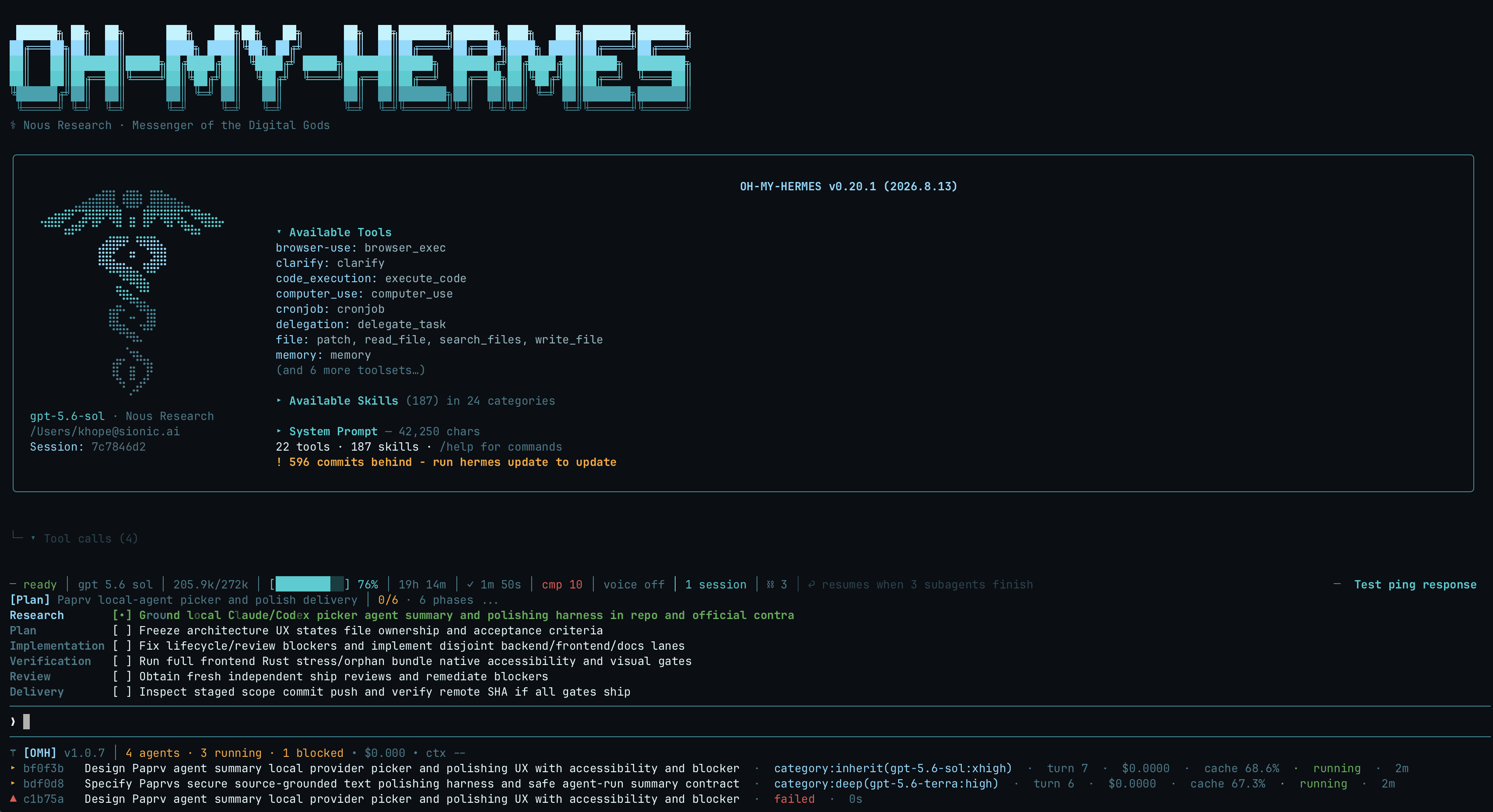
The launch banner will list available tools, group skills, OMH experts and model pools on one screen, so you can see at a glance what capabilities you have.
When running ulw-work, the panel displays the plan and the status of each lane in real time; when three independent tasks are executed in parallel, all tool calls are recorded.
启动横幅会把可用工具、分组技能、OMH 专家和模型池一屏列全,你现在有什么能力一目了然。
跑 ulw-work 时,面板实时显示计划与每条 lane 的状态;三个独立任务并行执行时,工具调用全部记录在案。
How to install怎么安装
macOS/Linux one-line command: curl -fsSL https://raw.githubusercontent.com/rlaope/oh-my-hermes/main/install.sh | sh; Windows PowerShell: irm https://raw.githubusercontent.com/rlaope/oh-my-hermes/main/install.ps1 | iex.
You can also use the wheel package of this site for offline installation: pip install oh_my_hermes-3.0.0-py3-none-any.whl. After installation, run omh doctor to self-check the environment.
After installation, restart the Hermes Agent session and enter a skill list command such as /skills to confirm that the omh-* expert skills have been loaded.
macOS / Linux 一行命令:curl -fsSL https://raw.githubusercontent.com/rlaope/oh-my-hermes/main/install.sh | sh;Windows PowerShell:irm https://raw.githubusercontent.com/rlaope/oh-my-hermes/main/install.ps1 | iex。
用本站的 wheel 包离线装也可以:pip install oh_my_hermes-3.0.0-py3-none-any.whl,装完运行 omh doctor 自检环境。
装完重启 Hermes Agent 会话,输入 /skills 之类的技能列表命令确认 omh-* 专家技能已加载。

Download instructions下载说明
The download button provides the v3.0.0 official wheel installation package (about 5.5 MB) from GitHub rlaope/oh-my-hermes Releases, which can be installed with one pip command.
下载按钮提供 v3.0.0 官方 wheel 安装包(约 5.5 MB),来自 GitHub rlaope/oh-my-hermes Releases,pip 一条命令即可安装。
Use reminder使用提醒
Oh My Hermes requires the Hermes Agent environment to be used; parallel lane will call multiple models at the same time, so pay attention to the API quota consumption. This article is compiled from public information. The resources are for learning and exchange only. Please follow the source permission.
Oh My Hermes 需要 Hermes Agent 环境配合使用;并行 lane 会同时调用多个模型,注意 API 额度消耗。本文整理自公开资料,资源仅供学习交流,请遵循来源许可。
⬇ Download · 点击下载:Oh My Hermes v3.0.0 安装包(wheel)(5.5 MB)
来自 GitHub 开源仓库 rlaope/oh-my-hermes v3.0.0 Release,pip install 即可安装
阅读与点赞数据保存在你的浏览器本地,欢迎留下你的想法。
 今日正能量学一点,用一点;今天种下的种子,会长成明天的能力。去免费下载专区 →广告
评论 文明发言,让讨论更有价值