OpenRig v0.6.2: Turn Claude Code and Codex into one agent squad with a single YAML fileOpenRig v0.6.2:用一份 YAML 把 Claude Code 和 Codex 编成一支智能体小队
A GitHub Trending project that shipped v0.6.2 today, around 2,700 stars. The idea is plain: a harness wraps one model, a rig wraps all of your harnesses. Define the team in YAML, boot it with one command, and run Claude Code plus Codex side by side inside the same rig. Official npm offline package, about 5.95 MB.
当天发布 v0.6.2 的 GitHub 热榜项目,约 2700 Star。它的思路很直白:harness 包的是一个模型,rig 包的是你所有的 harness——把队伍写进 YAML,一条命令启动,Claude Code 与 Codex 同处一个 rig 里按图编队。官方 npm 离线包约 5.95MB。
What it does differently from Claude Code and Codex一句话讲清它和 Claude Code、Codex 的区别
Claude Code and Codex are each "one model + one set of toolchain" harness, you open a few terminals is a few non-ventilating work sites. OpenRig adds a layer to the top: YAML defines the members, runtime, and responsibilities of this team, which unifies the launch and unifies the context.
In practice, it is "tell the result to the lead agent": you tell the lead agent the result you want, it dispatches different teams of specialists, and collects the results and decisions that need you to take a plate. The team member's work and context are always on the same address without you having to copy and paste the haul.
Claude Code 和 Codex 各自是「一个模型 + 一套工具链」的 harness,你开几个终端就是几个互不通气的工作现场。OpenRig 在上面再加一层:YAML 里定义这支队伍的成员、运行时和职责,由它统一启动、统一管上下文。
实际用起来是「跟 lead agent 说结果」:你把想要的结果讲给领队智能体,它去调度不同小组的专才,把结果和需要你拍板的决策收集回来给你。团队成员的工作和上下文始终待在同一个地址上,不用你复制粘贴搬运。
What the TUI shows: these screenshots are the real thingTUI 里有三种视图,配图就是它真实的运行画面
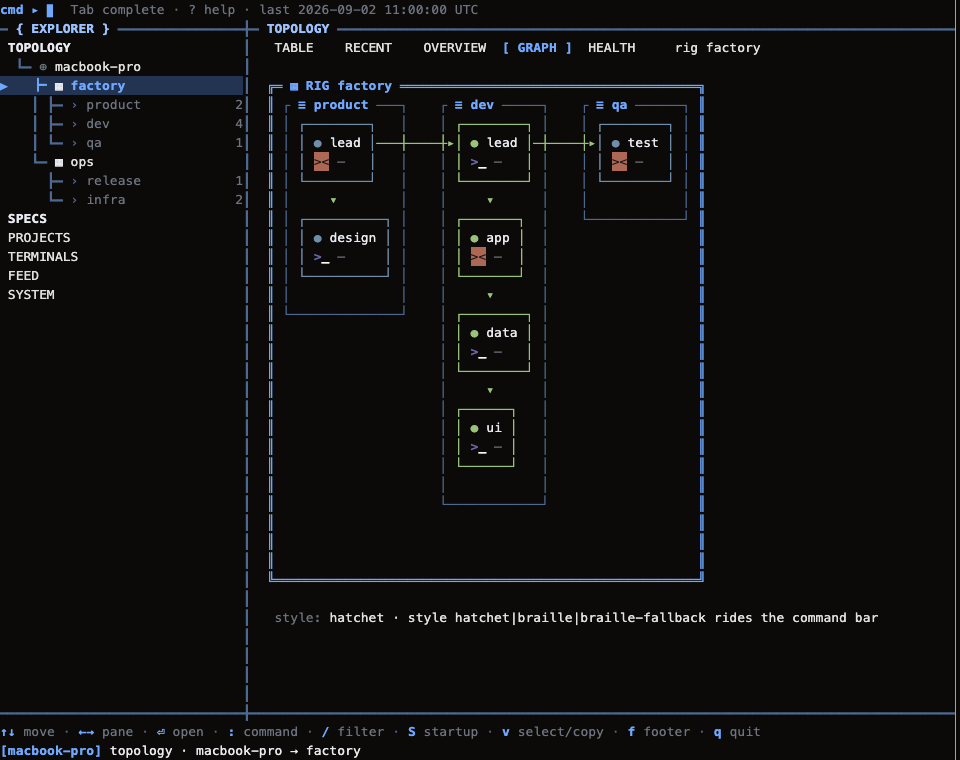
The first is the topology diagram: the entire rig agent is grouped by pod (product, development, testing) into a diagram, who is running, who is waiting to see at a glance. The second is a seating chart: each “seat” lists the runtime, model, context occupancy, and current state. The third is a single-seat detail page, which is used to stare at what a specific agent is doing.
The official README contains a real recording (10-second GIF), not a conceptual diagram of the rendering. The topology view and seating chart above are from the warehouse's own docs screenshots.
第一种是拓扑图:整支 rig 的智能体按 pod 分组(产品、开发、测试)连成一张图,谁在跑、谁在等一眼看清。第二种是座位表:每一个「座位」列出运行时、模型、上下文占用和当前状态。第三种是单个座位的详情页,用于盯一个具体智能体在干什么。
官方 README 里放的是真实录屏(10 秒 GIF),不是渲染的概念图。上图的拓扑视图和座位表来自仓库自己的 docs 截图。
Install and first launch: mind the platform limits安装与首次启动:注意平台限制
There are two hard thresholds: Node.js 22 or 24, and tmux. At present, only macOS and Linux are supported - native Windows is not yet supported, and WSL2 is officially marked as "not tested". Windows users should confirm their environment before installing.
There are only two commands: npm install -g @ openrig/cli install, rig setup --dry-run preview what it is about to change. Confirm that there is no problem and then run rig setup to formally apply.
It writes provider hooks and workspace trust settings on your machine, so it is recommended to back up the relevant configuration files before starting. You don't need to subscribe to an account: you can reuse your existing Claude Code or Codex account, or you can use either or both.
硬性门槛有两个:Node.js 22 或 24,以及 tmux。目前只支持 macOS 与 Linux——原生 Windows 尚未支持,WSL2 官方也标注「未测试」,Windows 用户装之前请先确认自己的环境。
命令只有两条:npm install -g @openrig/cli 安装,rig setup --dry-run 先预览它准备改动的东西。确认没问题再跑 rig setup 正式应用。
它会在你的机器上写入 provider hooks 和工作区信任设置,所以官方建议动手前先备份相关配置文件。用账号也不需要额外订阅:复用你已有的 Claude Code 或 Codex 账号即可,二选一或两个都用都行。
Download instructions下载说明
The download button provides an offline tarball (about 5.95 MB) of the official npm package @ openrig/cli 0.6.2, with the version number consistent with the repository v0.6.2 label.
Local installation: npm install -g./openrig-cli-0.6.2.tgz and still follow the rig setup --dry-run process above. The package contains the complete CLI, embedded plugins, static resources, and license files.
下载按钮提供官方 npm 包 @openrig/cli 0.6.2 的离线 tarball(约 5.95MB),版本号与仓库 v0.6.2 标签一致。
本地安装:npm install -g ./openrig-cli-0.6.2.tgz,随后仍按上面的 rig setup --dry-run 流程走。包内包含完整的 CLI、内嵌插件、静态资源与许可文件。
Notes使用提醒
This article is compiled from public sources and ships with the matching resource. Product features and pricing are subject to the official page. Resources are for learning and exchange only — please respect the original license.
本文整理自公开资料并附上配套资源;涉及产品的功能与价格以官方页面为准。资源仅供学习交流,请遵循来源许可。
⬇ Download · 点击下载:OpenRig CLI v0.6.2 官方 npm 离线包(约 5.95 MB)
来自 npm 官方 registry 的 @openrig/cli@0.6.2,含完整 CLI 与内嵌插件
阅读与点赞数据保存在你的浏览器本地,欢迎留下你的想法。
 今日正能量每天进步一点点,AI 陪你把想法变成现实。从一篇图文教程开始 →广告
评论 文明发言,让讨论更有价值