Teletext tutorial: Five minutes to build a no-vector rag with PageIndex that costs nothing图文教程:五分钟用 PageIndex 搭一个不花一分钱的无向量 RAG
Teach you how to use the PageIndex warehoused today: no vector database, no Embedding service, use the free quota LLM to build a tree-like index for your PDF, and then connect any large model for question and answer. Attached are diagrams of official benchmark data.
手把手教你用今天入库的 PageIndex:不用向量数据库、不买 Embedding 服务,拿免费额度的 LLM 给自己的 PDF 建树状索引,再接上任何大模型做问答。附官方基准数据图解。
Step 1: Install第一步:安装
Click the green button above this article to download the official wheel of PageIndex (about 0.56 MB), and execute the file name of the pip install download in the terminal; or directly install pageindex from PyPI. Python 3.9+ is required.
Verify the installation: The terminal input pageindex --help can see the subcommand list and it is successful.
点本文上方绿色按钮下载 PageIndex 的官方 wheel(约 0.56MB),在终端执行 pip install 下载的文件名 即可;或者直接 pip install pageindex 从 PyPI 安装。要求 Python 3.9+。
验证安装:终端输入 pageindex --help 能看到子命令列表就成功了。
Step 2: Tree index the document第二步:给文档建树状索引
Prepare a PDF (product manual, financial report, paper), execute the index command and specify a cheap or free LLM API key (Gemini Flash free quota is enough): pageindex build --doc your.pdf --out./index. After reading through the full text, it generates a JSON directory tree at./index, with abstracts and page numbers at each level.
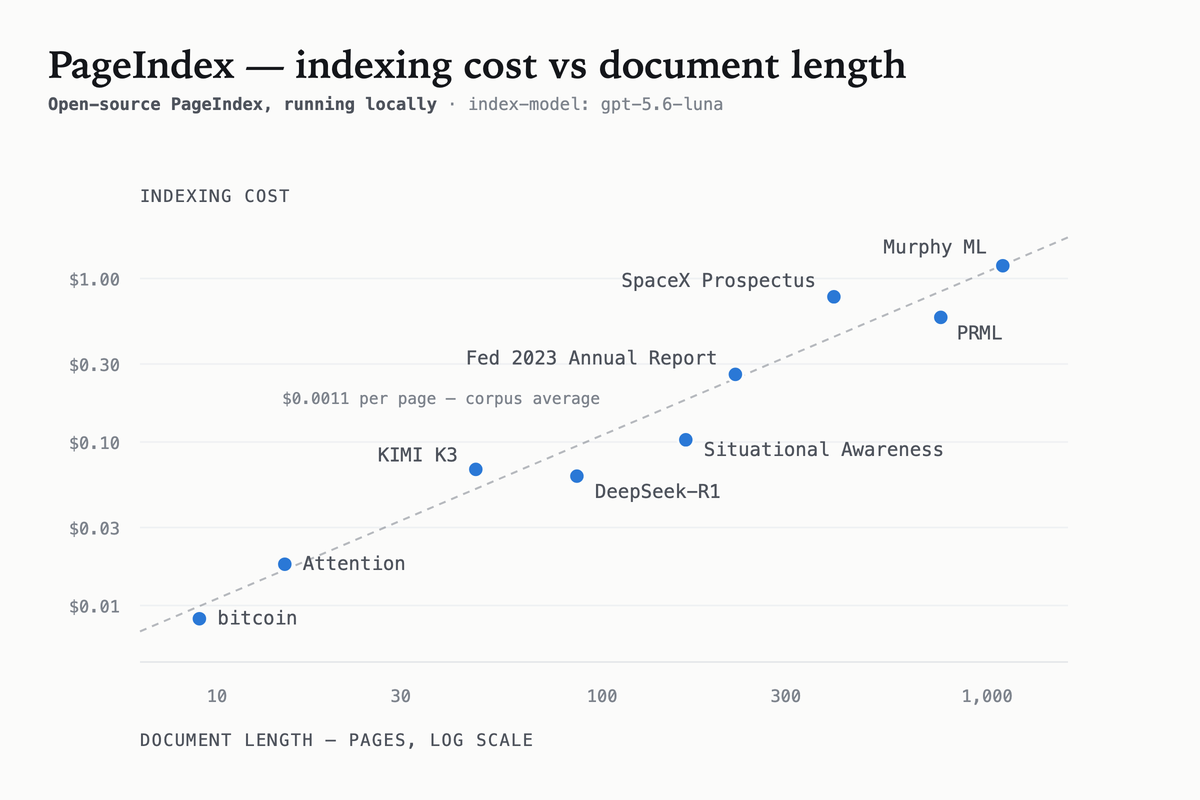
A 100-page document takes about 10 minutes and costs less than $0.1. The index is a one-time operation. After updating the document, you can run it again without maintaining any database.
准备一份 PDF(产品手册、财报、论文都行),执行索引命令并指定一个便宜或免费的 LLM API key(Gemini Flash 免费额度就够用):pageindex build --doc your.pdf --out ./index。它通读全文后会在 ./index 生成一棵 JSON 目录树,每层节点带摘要和页码。
100 页文档大约 10 分钟、成本 0.1 美元以下。索引是一次性的,文档更新后重跑一遍即可,不用维护任何数据库。
Step 3: Retrieve Q&A第三步:检索问答
Use the pageindex query subcommand (or a dozen lines of Python) to start the question: LLM determines the branch of the answer layer by layer along the directory tree, and finally directly takes out the corresponding original page and hands it to the model to generate the answer. Because the model is fed the complete original text page rather than cut pieces, the answer is quoted in the original text, and the hallucinations are significantly less.
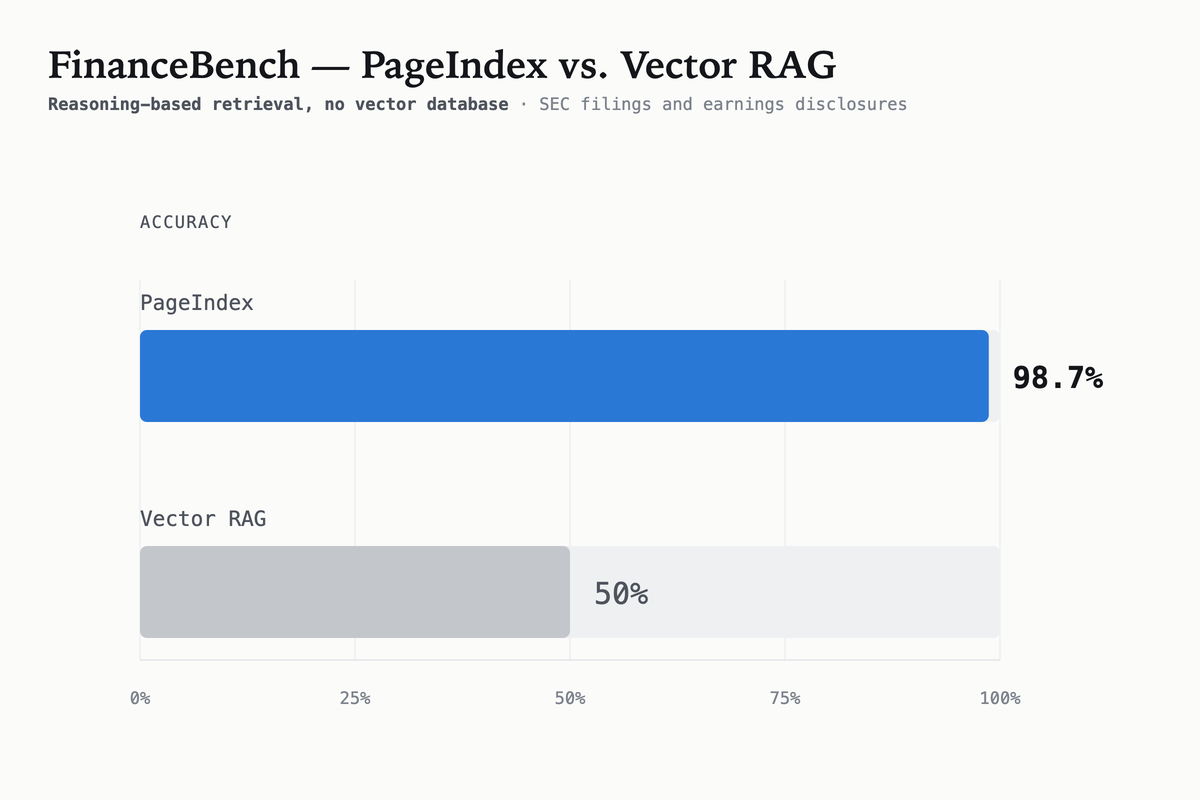
The official search accuracy on the FinanceBench financial question and answer benchmark reached 98.7%, and the mainstream vector rag was generally only around 60% during the same period - this is also the biggest selling point of the "no vector" route.
用 pageindex query 子命令(或十几行 Python)发起提问:LLM 沿目录树逐层判断答案所在分支,最后直接取出对应原文页交给模型生成回答。因为喂给模型的是完整原文页而不是切块碎片,答案带原文引用、幻觉明显更少。
官方在 FinanceBench 金融问答基准上的检索准确率达 98.7%,同期主流向量 RAG 普遍只有 60% 上下——这也是「无向量」路线最大的卖点。
Step 4: Connect to your agent第四步:接进你的智能体
Write "index before answer" into the system prompt, or encapsulate it into an MCP/function tool: enter the user's question and output the text of the hit original page. Claude Code, Gemini CLI, and self-built agents can all be called directly.
Advanced play: Build an index tree for each document when there are multiple documents. When retrieving, let the model pick the document first and then go to the branch. A database of thousands of pages is also enough. The measured indexing and retrieval of Chinese documents are normal.
把「先查索引再回答」写进系统提示词,或封装成一个 MCP/函数工具:输入用户问题,输出命中的原文页文本。Claude Code、Gemini CLI、自建智能体都能直接调用。
进阶玩法:多文档时给每份文档各建一棵索引树,检索时先让模型挑文档再走分支,几千页的资料库也够用。中文文档实测建索引和检索都正常。
Notes使用提醒
This article is compiled from public sources and ships with the matching resource. Product features and pricing are subject to the official page. Resources are for learning and exchange only — please respect the original license.
本文整理自公开资料并附上配套资源;涉及产品的功能与价格以官方页面为准。资源仅供学习交流,请遵循来源许可。
本篇为图文教程,直接按步骤操作即可,无需下载文件。
阅读与点赞数据保存在你的浏览器本地,欢迎留下你的想法。
 今日正能量学一点,用一点;今天种下的种子,会长成明天的能力。去免费下载专区 →广告
评论 文明发言,让讨论更有价值