PageIndex v0.2.21: Do not index “vectorless rag” documents for vector databasesPageIndex v0.2.21:不要向量数据库的「无向量 RAG」文档索引
VectifyAI open source, 38,000 Star rag new idea: do not cut the document, do not do Embedding, do not build a vector library, but let LLM directly generate a tree-like directory index for the document, retrieved like a human flip book according to directory reasoning positioning, accuracy in FinanceBench and other benchmarks inverse traditional vector rag, indexing cost is also one order of magnitude cheaper.
VectifyAI 开源、3.8 万 Star 的 RAG 新思路:不给文档切块、不做 Embedding、不建向量库,而是让 LLM 直接给文档生成一棵树状目录索引,检索时像人翻书一样按目录推理定位,准确率在 FinanceBench 等基准上反超传统向量 RAG,索引成本还便宜一个量级。
What exactly does "no vector" save you?「无向量」到底省了什么
The three-piece suite of traditional rags - document chopping, Embedding model, vector database - each is a cost and maintenance burden: if the chopping is not good, retrieval is not allowed, Embedding has to pay for tokens, and the vector library has to operate and maintain itself. PageIndex does this by handing the “semantic compression” step to the LLM: it reads through the document and outputs a hierarchically structured directory index (JSON), each layer labeled with a summary of the content and a page number.
When retrieving, the query starts from the root node of the directory tree, and the LLM determines "which branch the answer is more likely to be in" layer by layer. Finally, it is located to the specific page number, and the original page is directly handed over to the large model for answering. The hallucination rate is significantly lower because the full original page is returned rather than the fragmented fragment.
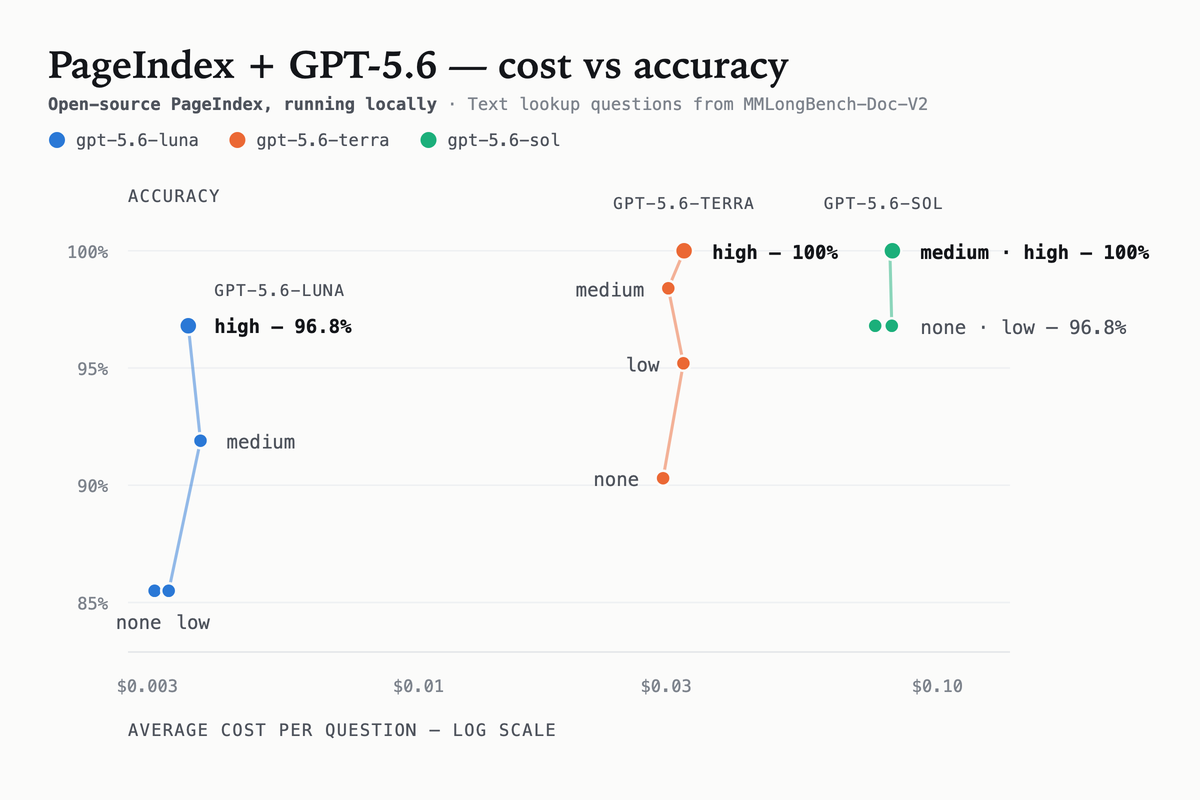
Official comparison on FinanceBench (Financial Document Q&A Benchmark): PageIndex retrieval accuracy rate is 98.7%, while the mainstream vector rag scheme is generally around 60%; indexing cost is only about one-tenth of the vector scheme. Below is a comparison of the official search results.
传统 RAG 的三件套——文档切块、Embedding 模型、向量数据库——每一件都是成本和维护负担:切块切不好就检索不准,Embedding 要按 token 付费,向量库还得自己运维。PageIndex 的做法是把「语义压缩」这一步交给 LLM:它通读文档后输出一份带层级结构的目录索引(JSON),每一层都标注内容摘要和页码。
检索时,查询会从目录树根节点开始,由 LLM 逐层判断「答案更可能在哪个分支」,最后定位到具体页码,把原文页直接交给大模型回答。因为返回的是完整原文页而不是被切碎的片段,幻觉率明显更低。
官方在 FinanceBench(金融文档问答基准)上的对比:PageIndex 检索准确率 98.7%,而主流向量 RAG 方案普遍在 60% 上下;索引成本只有向量方案的十分之一左右。下面是官方公布的检索效果对比图。
Actual cost and velocity data成本与速度实测数据
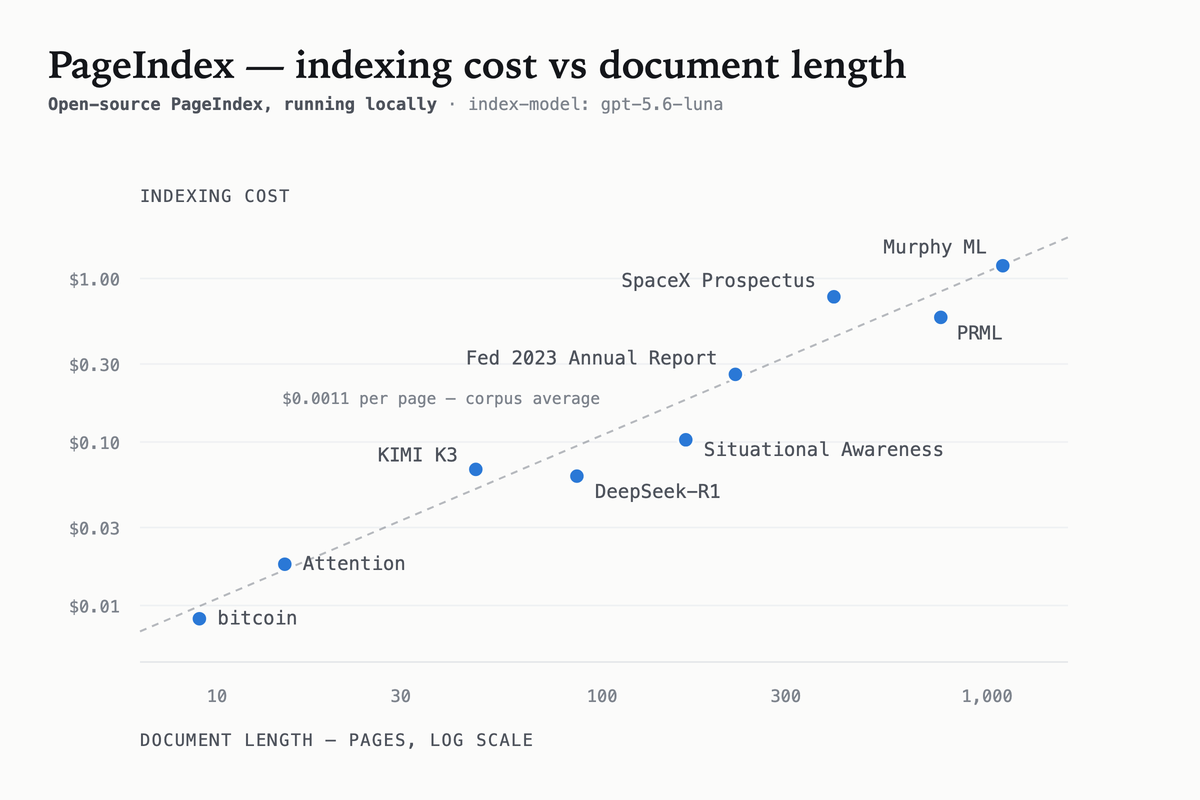
The official README directly gives the index cost curve: a PDF of about 100 pages, with a cheap model (such as Gemini Flash level) indexing costs about $0.1, built in 10 minutes; the query stage does not produce index cost, according to the normal LLM call billing.
The good news for individual developers: the entire link can be whitewashed - indexing Flash models with free credits and retrieving reasoning with native Ollama or free APIs. It supports PDF, Word, Markdown, Web pages and other common formats, and Chinese documents can be indexed normally.
The official chart below shows the growth curve of indexing costs with the number of pages, and you can see that it is basically linear and has a low slope, and thousands of pages of document libraries can be afforded.
官方 README 直接给出了索引开销曲线:一张 100 页左右的 PDF,用便宜的模型(如 Gemini Flash 级别)索引大约花费 0.1 美元上下,10 分钟内建完;查询阶段不产生索引开销,按正常 LLM 调用计费。
对个人开发者的好消息是:整条链路可以全白嫖——索引用免费额度的 Flash 模型,检索推理用本地 Ollama 或免费 API 都能跑。它支持 PDF、Word、Markdown、网页等常见格式,中文文档实测可正常建索引。
下面的官方图表展示了索引成本随页数的增长曲线,可以看到它基本是线性且斜率很低,几千页的文档库也能负担。
Download instructions下载说明
This site provides the official release v0.2.21 of the original Python wheel file (about 0.56 MB), which can be downloaded and installed by pip install; you can also directly pip install pageindex from PyPI. Python 3.9+ is required.
It provides both cloud API (pageindex.ai) and pure local usage: the local mode comes with a CLI, and an LLM API key can be indexed. For detailed steps to get started, see the graphic tutorial released synchronously on this site today.
本站提供官方 Release v0.2.21 的 Python wheel 原文件(约 0.56MB),下载后 pip install 即装;也可以直接 pip install pageindex 从 PyPI 拉。要求 Python 3.9+。
它同时提供云端 API(pageindex.ai)和纯本地两种用法:本地模式自带 CLI,配一份 LLM API key 就能建索引。详细上手步骤见本站今天同步发布的图文教程。
Notes使用提醒
This article is compiled from public sources and ships with the matching resource. Product features and pricing are subject to the official page. Resources are for learning and exchange only — please respect the original license.
本文整理自公开资料并附上配套资源;涉及产品的功能与价格以官方页面为准。资源仅供学习交流,请遵循来源许可。
⬇ Download · 点击下载:PageIndex v0.2.21 Python wheel 官方包(约 0.56 MB)
来自官方 GitHub Release,pip install 后即可建索引;支持 PDF/Word/Markdown
阅读与点赞数据保存在你的浏览器本地,欢迎留下你的想法。
 今日正能量保持好奇,持续探索,未来的你会感谢今天的开始。挑一个好工具上手 →广告
评论 文明发言,让讨论更有价值