PR-Agent: The pioneer of open-source AI code review is back, offering a health check for any PR with a single command.PR-Agent:开源 AI 代码审查的鼻祖回归,一行命令给任意 PR 做体检
AI code reviews are now everywhere, but the pioneer of this category is still active: The-PR-Agent/pr-agent (Qodo's open-source version returned after being taken over by the community) made a comeback on GitHub Explore's trending list this week, with 16.4K stars. The four-piece set of /review, /describe, /improve, and /ask covers GitHub, GitLab, Bitbucket, and Azure DevOps, and can be run locally with pip install pr-agent.
AI 代码审查现在遍地开花,但这个品类的开创者还在活跃:The-PR-Agent/pr-agent(Qodo 开源版由社区接管后回归)本周重回 GitHub Explore 热榜,16.4K 星。/review、/describe、/improve、/ask 四件套覆盖 GitHub、GitLab、Bitbucket 和 Azure DevOps,pip install pr-agent 就能本地跑。
Why "The Return of the Founder"?为什么是「鼻祖回归」
PR-Agent is one of the earliest open-source projects to turn "AI PR review" into a product. It was formerly the open-source version of Qodo Merge from Codex (Codium). After Qodo scaled back its commercial operations, the project was taken over by the community and continues to be maintained under the The-PR-Agent organisation. Recently, it has reappeared on GitHub Explore's Python trending list, and its popularity is rising again.
Core four-piece set: /review provides a structured report on review effort ratings, related tests, suspected bugs, and security concerns; /describe automatically generates PR descriptions and change summaries; /improve provides actionable improvement suggestions; /ask allows you to ask questions on any line of code. There are also extension tools such as automatic tagging and rule-based scanning of work orders for compliance.
Its platform coverage is its biggest competitive advantage: it is fully supported by GitHub, GitLab, Bitbucket, and Azure DevOps, while the local CLI mode does not rely on any platform configuration and can be used for reviews right away.
PR-Agent 是最早把「AI 评审 PR」做成产品的开源项目,前身是 Codex(Codium)家的 Qodo Merge 开源版;Qodo 商业化收缩后,项目由社区接管为 The-PR-Agent 组织继续维护,近期在 GitHub Explore 的 Python 热榜上重新出现,热度回升。
核心四件套:/review 给出评审努力度评级、相关测试、疑似 Bug 和安全顾虑的结构化报告;/describe 自动生成 PR 描述和变更摘要;/improve 给出可落地的改进建议;/ask 允许你在任意代码行提问。另有自动打标签、按规则扫描工单合规等扩展工具。
平台覆盖是它最大的护城河:GitHub、GitLab、Bitbucket、Azure DevOps 全支持,本地 CLI 模式则不依赖任何平台配置,拿来就能审。
What it really looks like when you run跑起来的真实样子
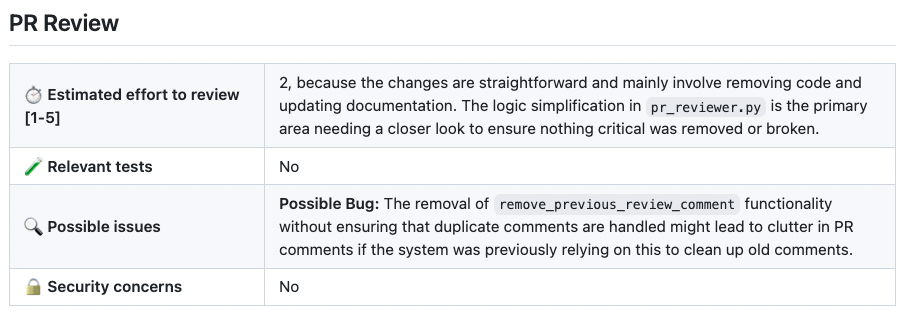
Take /review as an example: It builds a structured report in the PR – estimating the review effort on a scale of 1-5, assessing whether testing is sufficient, listing potential bugs and security concerns one by one, and providing reasons for each assessment. In the screenshot, it correctly identifies a corner-case risk like "Removing remove_previous_review_comment may lead to the accumulation of duplicate comments".
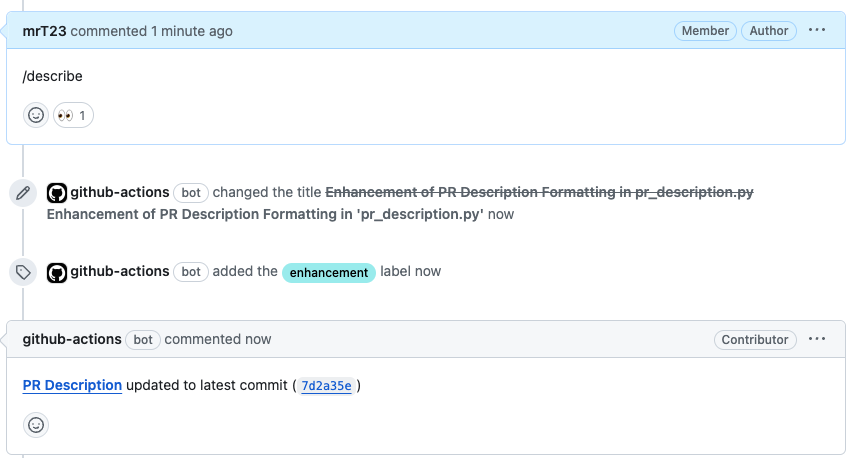
The output of /describe is a standardised PR title + type label + change overview, and it can also overlay visual markers on the diff to indicate the intent of each change (describe_markers series). /improve, on the other hand, posts each item in the form of a comment containing a "suggestion + reason", and whether to accept it or not is decided by a person.
The most practical approach for individual developers is the local CLI: no platform connection, no bot installation. Simply run the review directly on a PR URL or local diff, and add the LLM key to the configuration file.
以 /review 为例:它会在 PR 里盖出一栋结构化报告楼——评审努力度 1-5 估算、测试是否充分、可能的 Bug、安全顾虑逐项列出,并给出每项判断的理由,截图里它正确指出了「删除 remove_previous_review_comment 可能导致重复评论堆积」这类边角风险。
/describe 的输出则是标准化的 PR 标题 + 类型标签 + 变更概览,还能在 diff 上叠加可视化标记,标注每个改动的意图(describe_markers 系列);/improve 则以「建议 + 理由」的评论形式逐条贴出,接受与否由人决定。
对个人开发者最实用的姿势是本地 CLI:不接平台、不装机器人,直接对着一个 PR URL 或本地 diff 跑审查,把 LLM key 配到配置文件里即可。
Download & Install下载与安装
Click the button above to download pr-agent-0.50.0.tar.gz (0.79MB, PyPI official sdist). Local installation: pip install ./pr-agent-0.50.0.tar.gz, requires Python 3.9+; or simply pip install pr-agent to install the same version.
Three steps for local review: Configure .secrets.toml or environment variables to enter your LLM key (OpenAI/Claude/DeepSeek, etc. are all supported) → Run python -m pr_agent.cli --pr_url <PR地址> review → Wait a moment and the report will be printed directly to the terminal.
To integrate with your team's workflow, configure GitHub Actions or GitLab CI according to the official documentation. Each pull request will automatically trigger /describe and /review. For differences between the self-hosted and commercial versions, see the comparison page in the repository documentation.
点上方按钮下载 pr-agent-0.50.0.tar.gz(0.79MB,PyPI 官方 sdist)。本地安装:pip install ./pr-agent-0.50.0.tar.gz,需要 Python 3.9+;或直接 pip install pr-agent 拉同版本。
本地审查三步:配置 .secrets.toml 或环境变量写入你的 LLM key(OpenAI/Claude/DeepSeek 等均支持)→ 执行 python -m pr_agent.cli --pr_url <PR地址> review → 稍等片刻报告直接打印到终端。
想接进团队工作流,按官方文档配 GitHub Action 或 GitLab CI,每个 PR 自动触发 /describe 与 /review;自托管版与商业版功能差异见仓库文档 comparison 页。
Note小提示
The quality of the review depends on the model given to it: for the same repository, running /review with a strong model can catch real bugs, while a weak model is likely to output correct but useless waffle. It is recommended to run /review on all PRs and /improve on key PRs to avoid comment fatigue. The official PR-Agent PyPI package that accompanies this article can be found via the download button above.
审查质量取决于给它的模型:同样的仓库,用强模型跑 /review 能抓到真 Bug,弱模型容易输出正确但无用的废话。建议 /review 全量跑、/improve 挑关键 PR 跑,避免评论疲劳。本文配套 PR-Agent 官方 PyPI 包见上方下载按钮。
⬇ Download · 点击下载:PR-Agent v0.50.0 官方 PyPI 源码包
MIT · PyPI 官方 sdist · pip install ./pr-agent-0.50.0.tar.gz 本地安装,或 pip install pr-agent
阅读与点赞数据保存在你的浏览器本地,欢迎留下你的想法。
 今日正能量学一点,用一点;今天种下的种子,会长成明天的能力。去免费下载专区 →广告
评论 文明发言,让讨论更有价值