A step-by-step guide to reviewing code locally with PR-Agent: No need to install a bot – generate a report with a single command手把手用 PR-Agent 本地审查代码:不装机器人,一条命令出报告
Teams may not be willing to install robots in their repositories, but everyone wants to merge good code. This tutorial uses the official PyPI package of PR-Agent v0.50.0, which was added to the repository today, to guide you through the four steps of "installing the package → configuring the key → reviewing a PR locally → understanding the report", without touching any platform configuration throughout the process.
团队未必愿意给仓库装机器人,但每个人都想把好代码关。这篇教程用今天入库的 PR-Agent v0.50.0 官方 PyPI 包,带你走通「装包 → 配 key → 本地审一个 PR → 读懂报告」四步,全程不碰任何平台配置。
Step 1: Install and Configure Key第 1 步:安装与配置 Key
Click the button above to download pr-agent-0.50.0.tar.gz, then run pip install ./pr-agent-0.50.0.tar.gz (Python 3.9+). After installation, use a command such as python -m pr_agent.cli --version to confirm that it can run.
Create a .secrets.toml file in the root directory of the project (or use environment variables), and enter at least one LLM key, for example, [openai] key = "sk-...". Claude, DeepSeek, etc. are also supported. For field names, see the Configuration page of the repository.
The key is sensitive information: .secrets.toml must be added to .gitignore. The official documentation clearly reminds us of this point.
点上方按钮下载 pr-agent-0.50.0.tar.gz,执行 pip install ./pr-agent-0.50.0.tar.gz(Python 3.9+)。装完用 python -m pr_agent.cli --version 之类命令确认可运行。
在项目根目录建一个 .secrets.toml(或用环境变量),至少写入一个 LLM 的 key,例如 [openai] key = "sk-...";也支持 Claude、DeepSeek 等,字段名见仓库 Configuration 页。
key 属于敏感信息:.secrets.toml 一定要加进 .gitignore,官方文档对这一点有醒目提醒。
Step 2: Review a PR locally第 2 步:本地审查一个 PR
Choose a PR you want to review, copy its full URL, and then run: python -m pr_agent.cli --pr_url <PR地址> review. After a few dozen seconds, the structured review report is printed directly in the terminal.
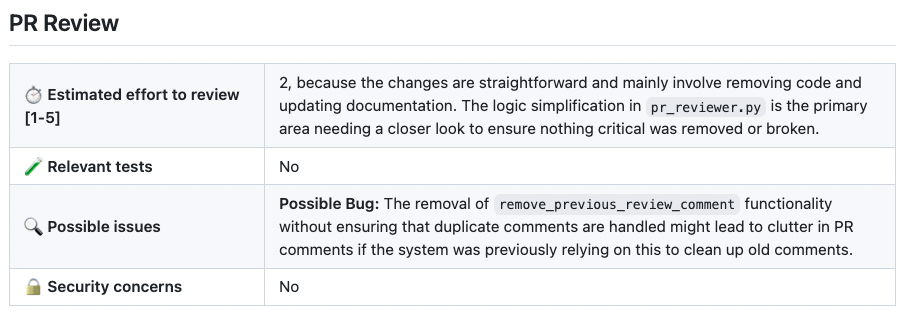
The structure of the report is as shown in the screenshot: Review effort (1–5), Whether relevant tests exist, Possible issues (list of suspected bugs and reasons for each), Security concerns. In the screenshot example, it accurately points out the specific risk that "removing the remove_previous_review_comment function may lead to the accumulation of duplicate comments".
Try replacing "review" with other tool commands: "describe" generates a PR description, "improve" provides suggestions for improvement, and "ask <question>" allows you to ask any question about the PR. The four commands have the same parameters and can be run in turn.
挑一个你想审的 PR,复制它的完整 URL,然后执行:python -m pr_agent.cli --pr_url <PR地址> review。几十秒后,结构化审查报告直接打印在终端里。
报告的结构就是截图那栋楼:评审努力度(1-5)、相关测试是否存在、Possible issues(逐条列出疑似 Bug 及理由)、Security concerns。截图例子里它准确指出「删除 remove_previous_review_comment 功能可能导致重复评论堆积」这种细节风险。
把 review 换成其他工具词试试:describe 生成 PR 描述、improve 给改进建议、ask <问题> 允许你对着 PR 提任意问题。四个命令参数一致,可以轮着跑。
Step 3: Understand the outputs of /describe and /improve第 3 步:读懂 /describe 与 /improve 的产出
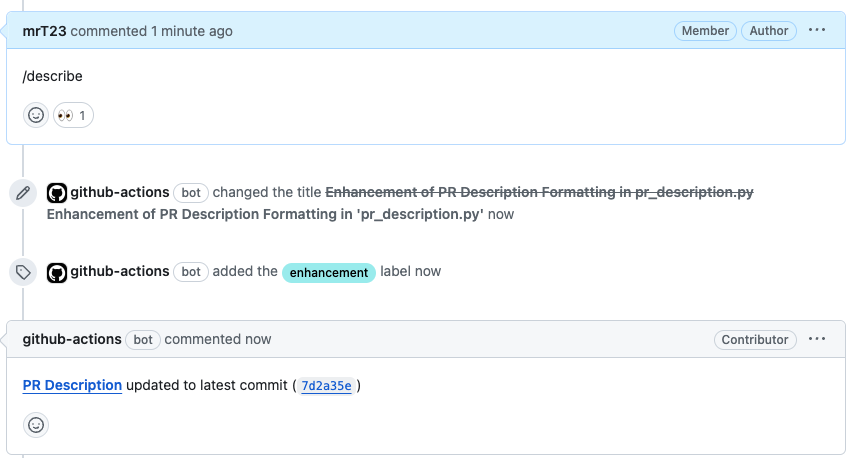
The output of /describe is a PR description that can be pasted directly: title, type label (bug fix/feature/refactor…), and change overview. For colleagues who are used to writing "updated some things", this command is a lifesaver.
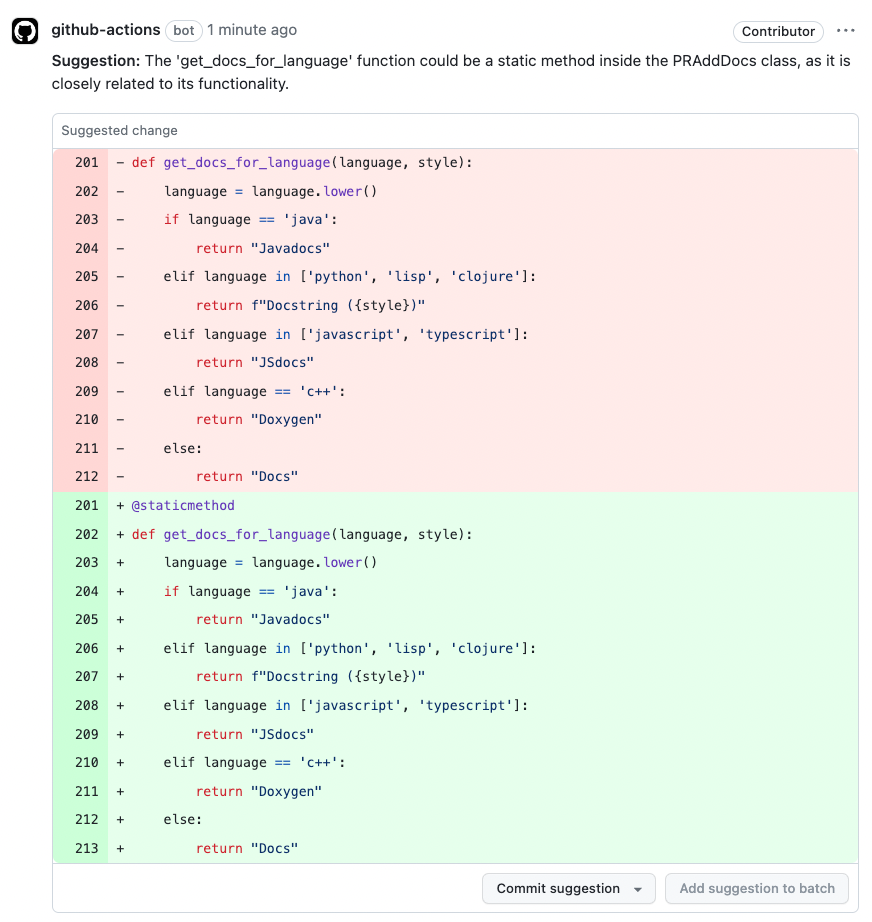
Each suggestion from /improve follows a three-part structure of "issue + suggestion + reason", and directly corresponds to specific lines of code. After running it, first look at the items marked as high priority. Low-priority items can be kept as a checklist for reference.
Recommended workflow in practice: Run /review and /describe for every PR, and only add /improve for key modules to avoid generating too many suggestions that no one will read.
/describe 的产出是一份可以直接粘贴的 PR 描述:标题、类型标签(bug fix / feature / refactor…)、变更概览。对习惯写「更新了一些东西」的同事,这个命令是救星。
/improve 的每条建议都是「问题 + 建议 + 理由」三段式,直接对应到具体代码行。跑完先看它标为高优先级的条目,低优先级的当 checklist 备查即可。
实践中推荐节奏:每个 PR 都跑 /review + /describe,只有关键模块再追加 /improve,避免建议多到没人看。
Step 4: Progression – Approaching CI Automated Reviews第 4 步:进阶——接进 CI 自动审查
Once it is running smoothly locally, you can configure PR-Agent as a GitHub Action or GitLab CI job according to the repository documentation: Each new PR automatically triggers /describe and /review, and the report is posted as a comment in the PR, visible to all team members.
Deployment can be done either via Docker or pip. The repository wiki provides a comprehensive comparison of the two integration methods: GitHub App and Webhook. Once the platform token is configured, the contents of the previously used local .secrets.toml file can be transferred to the server-side configuration.
Quota and cost recommendations are used for budget control in CI based on "only review new code" and daily limits. The usage section of the documentation provides ready-made templates.
本地跑顺后,可以按仓库文档把 PR-Agent 配成 GitHub Action 或 GitLab CI 作业:每个新 PR 自动触发 /describe 和 /review,报告以评论形式贴在 PR 里,团队全员可见。
自托管用 Docker 或 pip 方式部署均可,仓库 wiki 有 GitHub App 与 Webhook 两种接法的完整对比;配置好平台 token 后,之前本地用的 .secrets.toml 内容平移到服务端配置里即可。
配额与成本建议在 CI 里按「只审新增代码」和每日上限做预算控制,文档的 usage 章节给了现成模板。
Problem Encountered遇到问题
pip installation error: Confirm that Python 3.9+ is installed and that pip points to the same interpreter; report is empty or times out: Most likely, the key is invalid or the network cannot reach the model API. Test the key with curl first; poor report quality: Switch to a more powerful model. The output quality of PR-Agent is mainly determined by the model. The official PR-Agent PyPI package accompanying this article can be found via the download button above.
pip 安装报错:确认 Python 3.9+ 且 pip 指向同一解释器;报告为空或超时:多数是 key 无效或网络到不了模型 API,先用 curl 测 key;报告质量差:换更强的模型,PR-Agent 的输出质量主要由模型决定。本文配套 PR-Agent 官方 PyPI 包见上方下载按钮。
⬇ Download · 点击下载:PR-Agent v0.50.0 官方 PyPI 源码包(本教程配套)
MIT · PyPI 官方 sdist · 教程全程使用本包安装
阅读与点赞数据保存在你的浏览器本地,欢迎留下你的想法。
 今日正能量学一点,用一点;今天种下的种子,会长成明天的能力。去免费下载专区 →广告
评论 文明发言,让讨论更有价值