Tree Clipping Qiaomu Clipper: Clip webpages and videos into Obsidian's open source plugin and ask AI while reading (rushing to GitHub Trends for three days)乔木剪藏 Qiaomu Clipper:把网页和视频剪进 Obsidian 的开源插件,边读边问 AI(发布三天冲上 GitHub 趋势榜)
A Chrome extension made by a Chinese team, specializing in "collecting gray": when you read a good article, press aaa to enter a clean reading page, cross the line to ask questions on the spot AI; watch YouTube, B site video, press aaa to open the bilingual subtitle toolbar, click the timestamp to jump back to that sentence; when you see half of the sudden ideas, press N to write a small card, along with the source and time point, automatically added to today's Obsidian diary. Mit is open source, the data is left on the machine, and no model can be used as a pure high-quality clipping tool.
一个中文团队做的 Chrome 扩展,专治「收藏夹吃灰」:读到好文章按 aaa 进入干净阅读页,划线就能就地提问 AI;看 YouTube、B 站视频按 aaa 打开双语字幕工具栏,点时间戳直接跳回那句话;看到一半突然有想法,按 N 写一张小卡片,连同来源与时间点自动追加进今天的 Obsidian 日记。MIT 开源、数据留在本机,不配任何模型也能当纯粹的高质量剪藏工具用。
What Problems Does It Solve?它解决什么问题
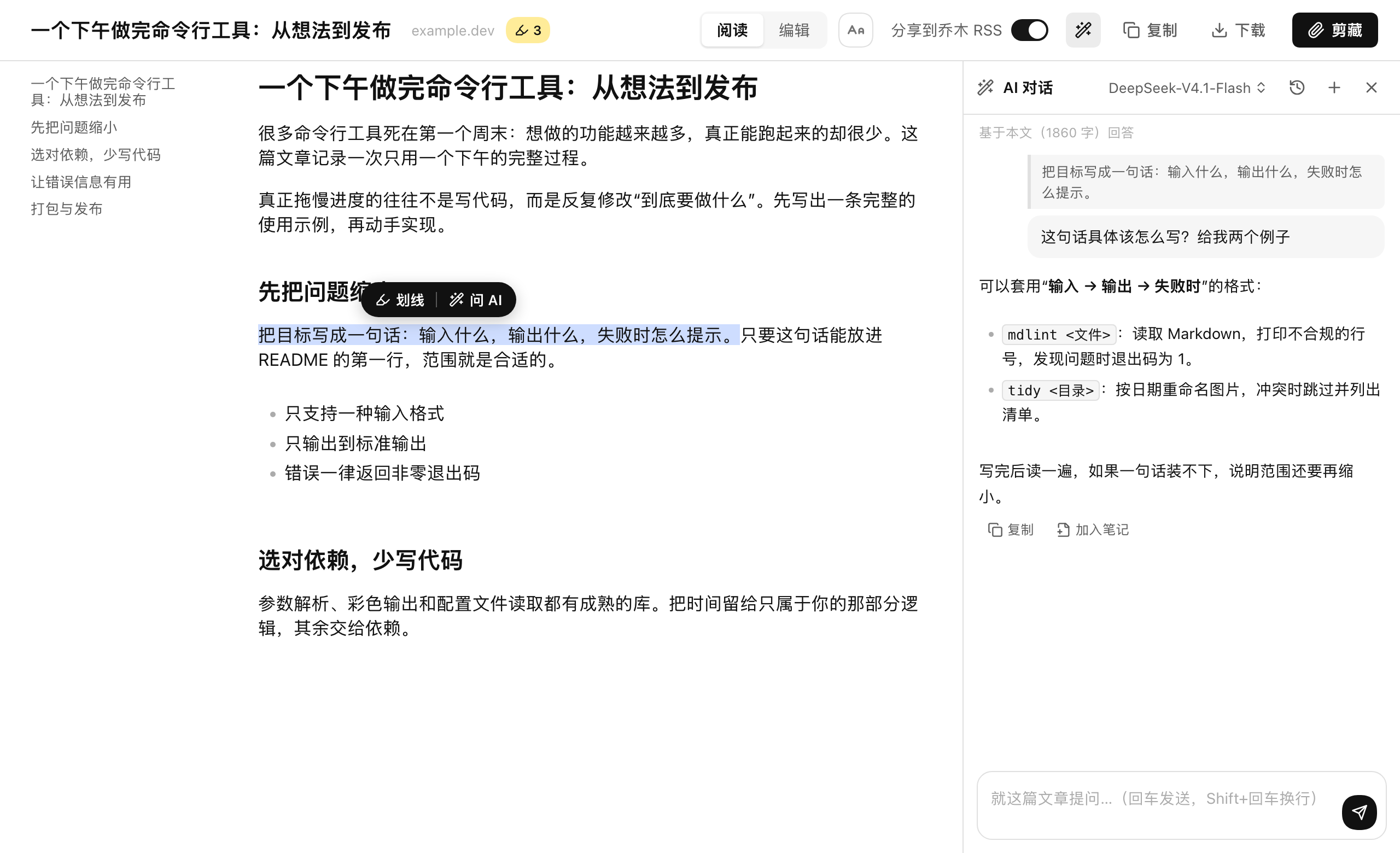
Pain point 1: I still don't read a bunch of articles. It draws the body of the webpage clean, underlines or selects a paragraph and asks the AI directly on the reading page, and the reading and questioning no longer cuts back and forth between the tabs.
Pain point 2: Cut back and forth between the player and the document while watching the video. Press aaa to put the video side by side with the subtitles. The subtitles can be clicked back with a time stamp to review which period and which sentence.
Pain point three: foreign subtitles are slow to read. Open "Chinese Translation", compare the original text, Chinese translation, and timestamp, and the subtitles themselves can be copied and downloaded into a manuscript.
Pain point four: Repeat the requirement every time you ask the AI. In the dialog settings, you can save the global commands and common shortcut words, and the font size is also fixed according to your own habits.
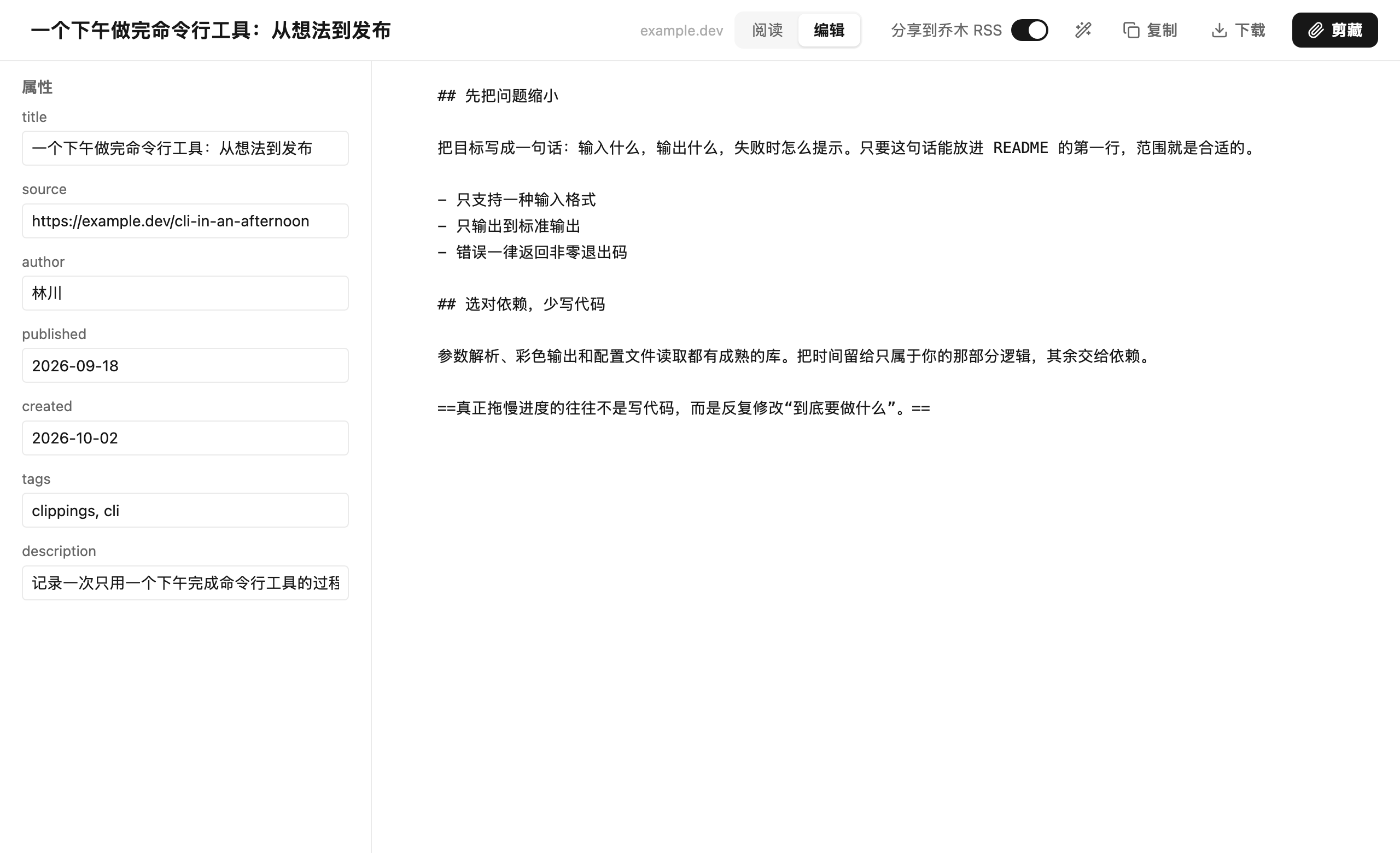
Pain point 5: The hidden pop-up window is too small, and it is difficult to change the title and text. Press eee to enter the full page editor, markdown side by side on the right side of the left property, and edit one-click clipping.
痛点一:收藏一堆文章还是没读懂。它把网页正文抽干净,划线或选中一段直接在阅读页问 AI,阅读和提问不再来回切标签页。
痛点二:看视频时播放器和文稿来回切。按 aaa 让视频与字幕并排同屏,字幕带时间戳可点击回跳,想复习哪句点哪句。
痛点三:外语字幕看得慢。打开「中文翻译」,原文、中文译文、时间戳三栏对照,字幕本身也能复制和下载成文稿。
痛点四:每次问 AI 都要重复写要求。对话设置里可以把全局指令、常用快捷提示词存下来,字体字号也按自己的习惯固定。
痛点五:剪藏弹窗太小,改标题和正文很费劲。按 eee 进入整页编辑器,左侧属性右侧 Markdown 并排,编辑完一键剪藏。
Video Learning: Turn Your Video into a Book to Draw视频学习:把视频变成一本可以划线的书
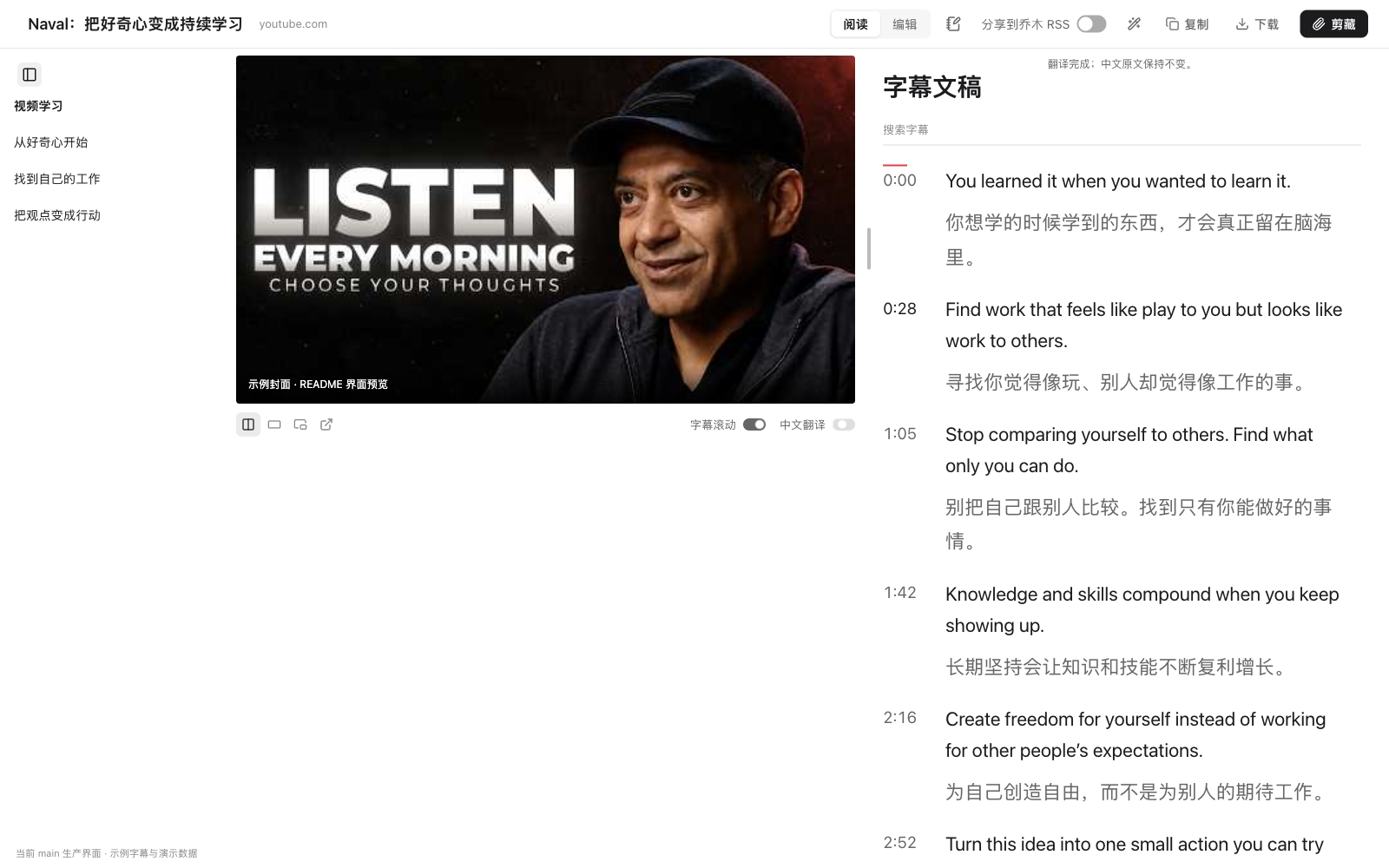
YouTube and the video page of Station B invoke the subtitle toolbar by aaa. The video and the bilingual subtitles are displayed on the same screen. The subtitle search supports keyword targeting. Find the timestamp and jump back to the corresponding screen.
The subtitle toolbar comes with a unified top bar to copy the full text, download the document, cut it into Obsidian, and ask the AI four actions in one step, eliminating the need to install a bunch of separate transcription plug-ins.
Version Tip: The subtitle toolbar of the video page of Station B is available from 1.11.0, and there is no video subtitle toolbar in versions 1.10.0 and earlier.
YouTube 与 B 站视频页按 aaa 唤起字幕工具栏,视频和双语字幕同屏显示,字幕搜索支持关键词定位,找到后点时间戳即可跳回对应画面。
字幕工具栏自带统一顶栏,复制全文、下载文稿、剪藏到 Obsidian、向 AI 提问四个动作一步到位,不必再装一堆单独的转录插件。
版本提示:B 站视频页的字幕工具栏从 1.11.0 起提供,1.10.0 及更早版本没有视频字幕工具栏。
Three shortcuts to complete the process三个快捷键走完整流程
aaa: Quickly double-click three times in a non-input box position to enter the reading page (article) or video learning mode (video).
N: Open the learning notes card and write "I understand". The content will be automatically appended to today's Obsidian diary with the source and time point.
qqq: Use the default template one-click clipping, whether to share publicly to RSS at the same time is determined by the switch in the settings.
eee: Enter the full-page Markdown editor, which is suitable for organizing and saving the title, properties, and body at one time.
aaa:在非输入框位置快速连按三下,进入阅读页(文章)或视频学习模式(视频)。
N:打开学习笔记小卡片,写下「我的理解」,内容会带上来源与时间点,自动追加到今天的 Obsidian 日记。
qqq:用默认模板一键剪藏,是否同时公开分享到 RSS 由设置里的开关决定。
eee:进入整页 Markdown 编辑器,适合把标题、属性、正文一次整理好再保存。
AI Interpretation Linkage with ObsidianAI 解读与 Obsidian 联动
The AI part comes complete with its own model: fill in your own service provider and API Key in the "AI Interpretation" of the extension settings, support custom global instructions and common prompts, and the language style and answer method can be fixed.
Users who only want to read articles and copy subtitles can do so without configuring AI at all, and the plugin is still available.
Note Writing to Obsidian requires additional installation of the local assistant provided by the project, and enabling the Diary core plugin in Obsidian; RSS sharing is an optional switch and is not public by default.
AI 部分完全自带模型:在扩展设置的「AI 解读」里填自己的服务商与 API Key,支持自定义全局指令和常用提示词,语言风格和回答方式可以固定下来。
只想读文章、复制字幕的用户可以完全不配置 AI,插件依然可用。
笔记写入 Obsidian 需要额外安装项目提供的本地助手,并在 Obsidian 中启用「日记」核心插件;RSS 分享是可选开关,默认不公开。
Download and Installation Instructions下载与安装说明
The Chrome Store is live, but the store version is 1.7.1 and the 1.14.2 update is still under review. For the full experience (especially the video subtitle toolbar) it is recommended to use the official 1.14.4 installation package directly below.
Download the Manifest V3 build. After unzipping, open "Developer Mode" in the upper right corner of chrome://extensions, click "Load Unzipped Extensions" and select the extracted folder.
The project includes both Firefox and Safari packages, which can be downloaded on-demand on the GitHub Releases page.
Chrome 应用商店已上线,但商店版本为 1.7.1,1.14.2 更新仍在审核中。想要完整体验(尤其是视频字幕工具栏)建议直接用下面的官方 1.14.4 安装包。
下载得到的是 Manifest V3 构建产物,解压后在 chrome://extensions 打开右上角「开发者模式」,点「加载已解压的扩展程序」选择解压出的文件夹即可。
项目同时提供 Firefox 与 Safari 版安装包,可在 GitHub Releases 页面按需下载。
Use reminder使用提醒
AI Q&A and translation require their own model API Key, at their own expense; not equipped with AI does not affect the function of reading, subtitling and cutting. The plugin will read the content of the page you are currently opening to extract the body, and pages involving accounts or sensitive information should be used with caution. This article is compiled from self-disclosed materials, and the resources are for learning and communication only. Please follow the project mit permission.
AI 问答与翻译需要自备模型 API Key,费用自理;不配 AI 不影响阅读、字幕与剪藏功能。插件会读取你当前打开的页面内容用于抽取正文,涉及账号或敏感信息的页面请谨慎使用。本文整理自公开资料,资源仅供学习交流,请遵循项目 MIT 许可。
⬇ Download · 点击下载:乔木剪藏 v1.14.4 Chrome 扩展包(约 10.9 MB)
来自 GitHub 开源仓库 joeseesun/qiaomu-clipper 官方 Releases(MIT 许可),Chrome Manifest V3 构建产物,解压后在开发者模式「加载已解压的扩展程序」即可
阅读与点赞数据保存在你的浏览器本地,欢迎留下你的想法。
 今日正能量学一点,用一点;今天种下的种子,会长成明天的能力。去免费下载专区 →广告
评论 文明发言,让讨论更有价值