Skills Manager: one app to run the skill libraries of 50+ coding tools — batch install, sync and back upSkills Manager:一个界面管好 50 多个编程工具的技能库,批量安装、同步、备份全都有
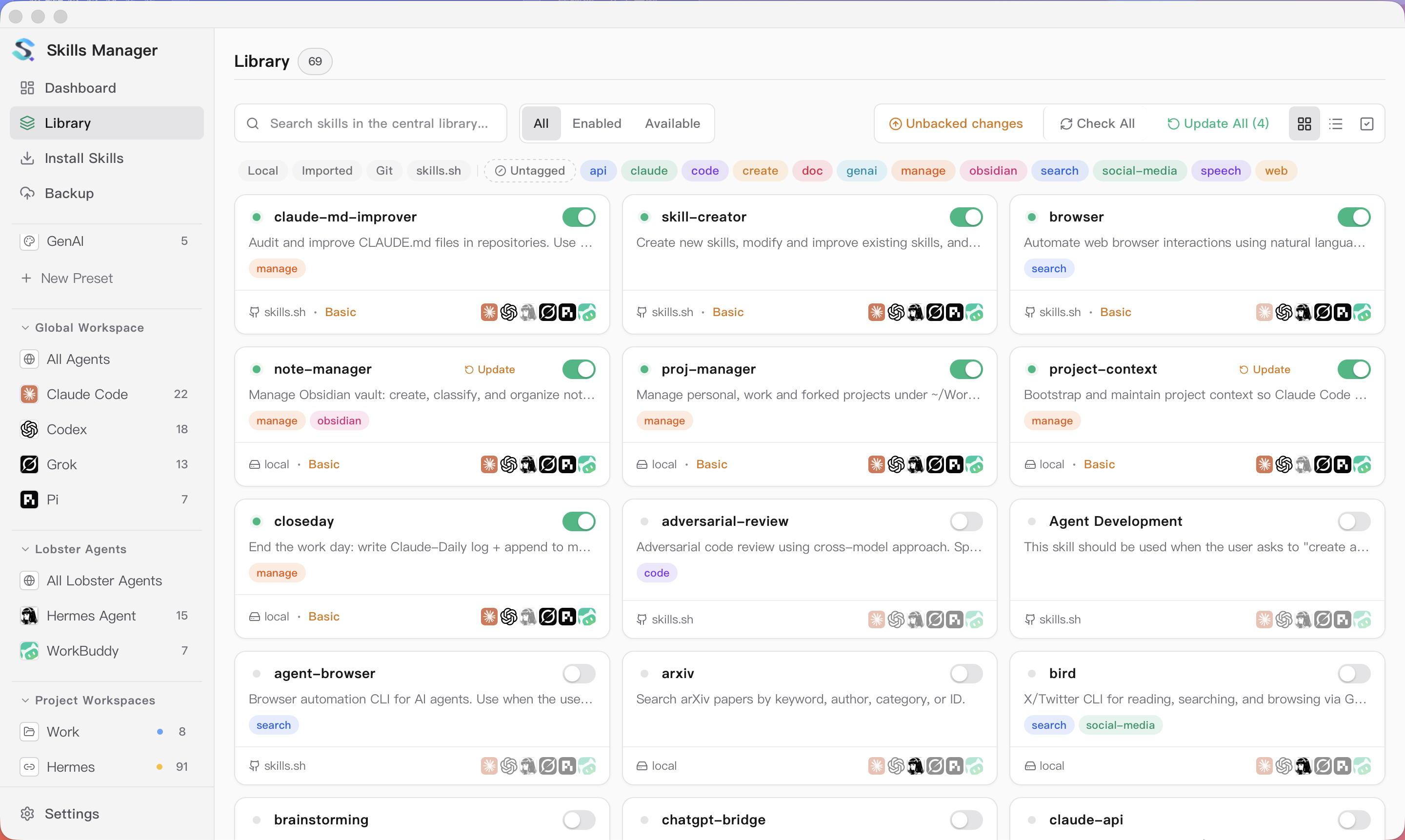
Skills end up scattered across each tool's own folders, and nobody remembers what is installed where or what has gone stale. Skills Manager (v1.41.0, 6,000+ stars) gathers everything into one central library: batch-install skills from the skills.sh ecosystem, enable and sync them across 50+ tools including Claude Code, Codex and Cursor, split workspaces per agent, and back it all up.
技能散落在每个工具自己的目录里,装了什么、哪边过期了根本记不住。Skills Manager(v1.41.0、6,000+ 星)把所有技能收进一个「中央库」:一键批量安装 skills.sh 生态里的技能,在 Claude Code、Codex、Cursor 等 50+ 工具之间同步启用,按智能体划分工作区,还带备份恢复。
Why you need it为什么需要它
Run two or three AI coding tools at once and you will install the same skill into each tool's folder again and again; updates and removals must be repeated everywhere, and the state quickly drifts out of sync.
Skills Manager's approach is "central library plus distribution": each skill is stored once and then enabled per tool as needed — upgrades, dedup and cleanup all happen in one interface.
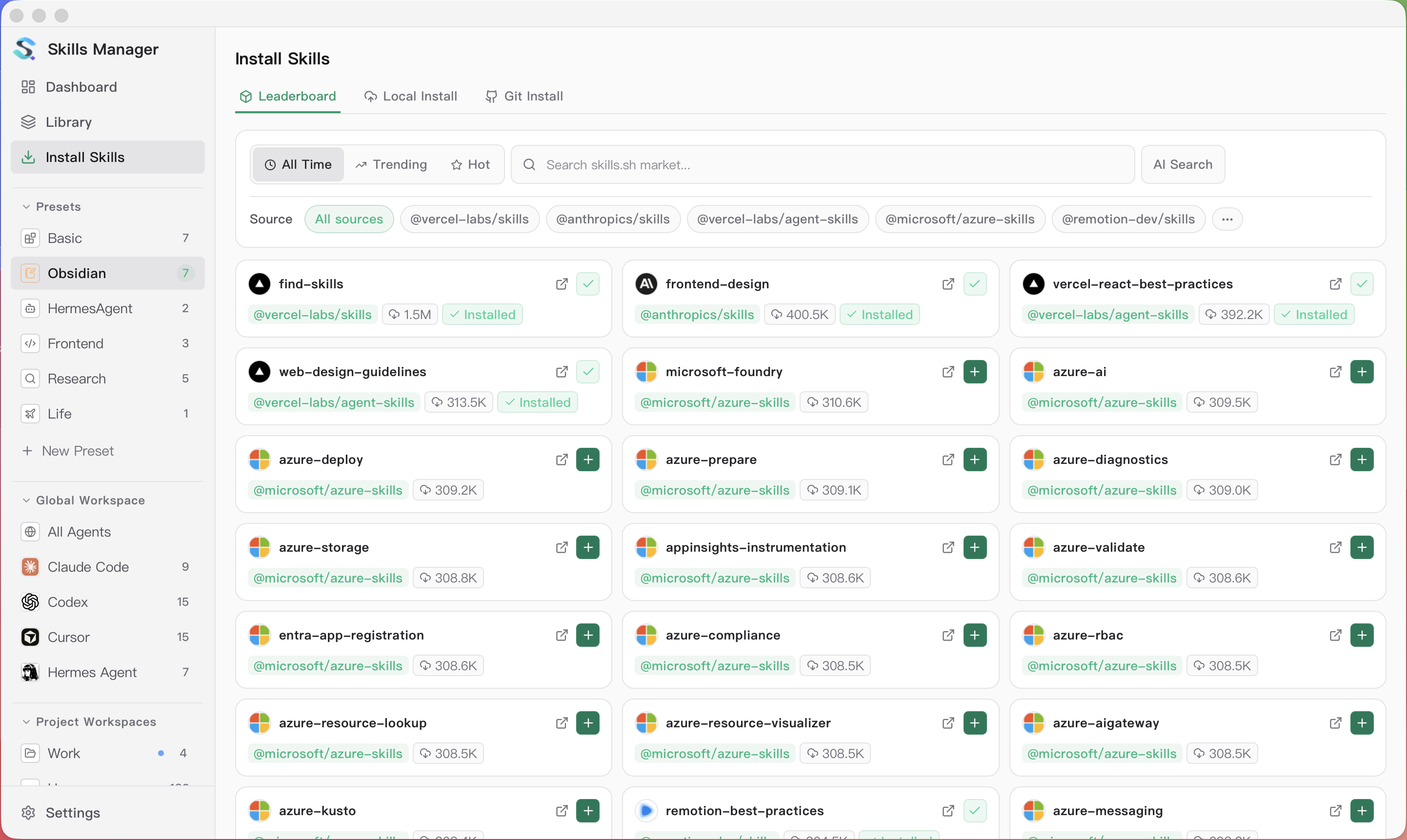
It also ships with online discovery for the skills.sh ecosystem, so you can search and install community skills without manually cloning repositories.
如果你同时用两三个 AI 编程工具,就会发现同一个技能要在每个工具的目录里各装一遍,更新与卸载都得挨个来,时间一长完全对不上账。
Skills Manager 的思路是「中央库 + 分发」:技能只装一份,再按需启用到各个工具,升级、去重、清理都在一个界面完成。
它还内置 skills.sh 生态的在线发现,可以直接搜索并安装社区技能,不用再手动 clone 仓库。
Core features at a glance核心功能一览
Central skill library: manage local, imported and Git-sourced skills in one place, with tag filters and enable toggles.
Multi-tool sync: works with 50+ coding tools including Claude Code, Codex and Cursor, organized into global, per-agent and per-project workspaces.
Backup and restore: snapshot all skills and settings with one click and restore them after a reinstall; GenAI presets can even draft new skills for you.
中央技能库:本地、导入、Git 来源的技能统一管理,支持标签分类与启用开关。
多工具同步:支持 Claude Code、Codex、Cursor 等 50+ 编程工具,按「全局工作区 / 智能体工作区 / 项目工作区」分层管理。
备份与恢复:一键备份全部技能与配置,换机或重装时原样恢复,GenAI 预设还能一键生成新技能。
Getting started怎么用起来
Download the Windows installer below, install and open it, then let it scan your machine's existing tool folders to build the first inventory.
Search and batch-install skills on the Install Skills page, then filter by tags in the Library and enable them per tool, one by one or in bulk.
Set a backup folder and take a full snapshot right away; after that, just re-backup before any major change.
下载本文的 Windows 安装包,双击安装后打开,先让它扫描本机已有的工具目录,建立第一份技能清单。
在 Install Skills 页搜索需要的技能批量安装;在 Library 里按标签筛选,逐个或批量启用到目标工具。
建议第一时间设置备份目录并做一次全量备份;之后每次大改动前再备份一次即可。
Download instructions下载说明
The download button provides the Windows x64 installer from the official xingkongliang/skills-manager v1.41.0 GitHub release.
macOS (dmg), Linux (deb/rpm/AppImage) and CLI builds live on the same releases page — pick the one for your platform.
下载按钮提供 GitHub xingkongliang/skills-manager v1.41.0 官方 Release 的 Windows x64 安装程序。
macOS(dmg)、Linux(deb/rpm/AppImage)与 CLI 版本都在同一 Release 页,按平台选择即可。
Use reminder使用提醒
This article is compiled from public sources and ships with the matching resource. Product features and pricing are subject to the official page. Resources are for learning and exchange only — please respect the original license.
本文整理自公开资料并附上配套资源;涉及产品的功能与价格以官方页面为准。资源仅供学习交流,请遵循来源许可。
⬇ Download · 点击下载:Skills Manager 1.41.0 Windows x64 安装程序(11.34MB)
来自 GitHub xingkongliang/skills-manager v1.41.0 官方 Release;macOS、Linux 与 CLI 版本见官方 Release 页。
阅读与点赞数据保存在你的浏览器本地,欢迎留下你的想法。
 今日正能量学一点,用一点;今天种下的种子,会长成明天的能力。去免费下载专区 →广告
评论 文明发言,让讨论更有价值