Graphic tutorial: Use Strix to run an AI automatic penetration in three steps, from installing Docker to getting a vulnerability report with PoC图文教程:三步用 Strix 跑一次 AI 自动渗透,从装 Docker 到拿到带 PoC 的漏洞报告
Strix (66,000 Stars), which is in the database today, is an open source AI penetration testing tool. This tutorial takes you through the first automated security assessment in three steps: Prepare Docker and a large model Key → Install and configure → Point to the target directory to run and understand the report, and add how to integrate it into the Claude Code/CI process.
今天入库的 Strix(6.6 万 Star)是开源的 AI 渗透测试工具。本教程用三个步骤带你跑通第一次自动安全评估:备好 Docker 与大模型 Key → 安装并配置 → 指向目标目录开跑并读懂报告,并补充如何把它接进 Claude Code / CI 流程。
Step one: Prepare the running environment第一步:准备好运行环境
Strix's agent works in the Docker sandbox, so first make sure that the local Docker is installed and running (it is normal if docker ps can list it).
Prepare a large model API Key: OpenAI, Anthropic, Google, OpenRouter and other supported vendors will do. It is recommended to choose a cheap model with a large enough context to run the reconnaissance stage, which can save a lot of money.
Strix 的智能体在 Docker 沙箱里干活,所以先确认本机 Docker 已安装且正在运行(docker ps 能列出来即正常)。
再准备一个大模型 API Key:OpenAI、Anthropic、Google、OpenRouter 等受支持厂商都行。推荐挑一个便宜且上下文够大的模型跑侦察阶段,能省不少钱。
Step 2: Install Strix and configure the model第二步:安装 Strix 并配置模型
One command installation: curl -sSL https://strix.ai/install | bash; Python users can also pip install strix-agent directly.
Configure two environment variables: export STRIX_LLM="openrouter/z-ai/glm-5.3" to specify the model, and export LLM_API_KEY="your API Key". Write these two lines into the shell configuration file so that you don’t have to reset it every time in the future.
一条命令安装:curl -sSL https://strix.ai/install | bash;Python 用户也可以直接 pip install strix-agent。
配置两个环境变量:export STRIX_LLM="openrouter/z-ai/glm-5.3" 指定模型,export LLM_API_KEY="你的 API Key"。把这两行写进 shell 配置文件,以后不用每次重设。
Step 3: Point to the target, start running, and read the results第三步:指向目标开跑,读懂结果
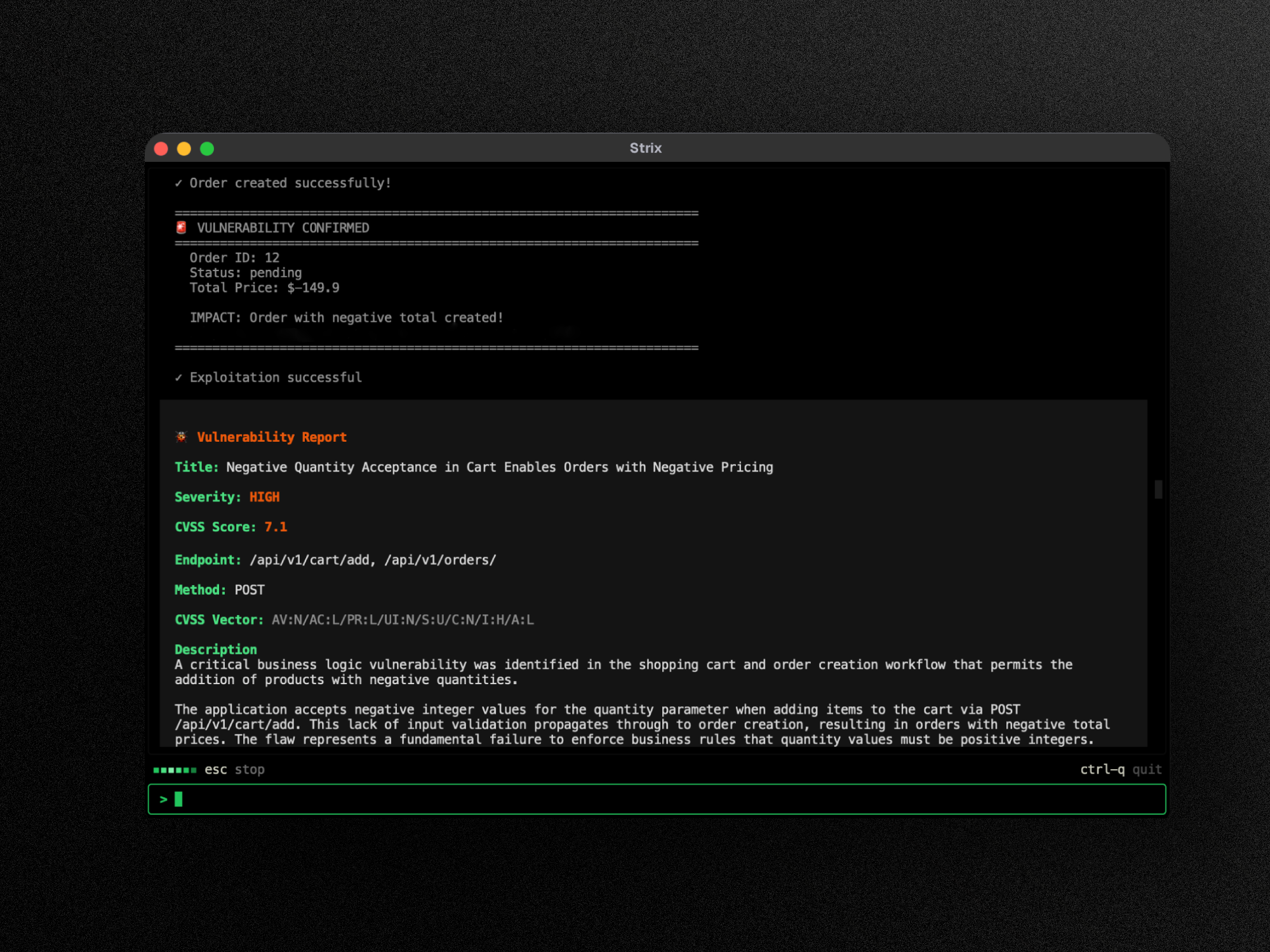
Execute strix --target ./your application directory in the project root directory. The first run will automatically pull the sandbox image (you need to wait a few minutes), and then it will automatically detect, exploit, and verify, all the way through.
The results fall into strix_runs/<run-name>: each vulnerability comes with a reproducible PoC, reproduction steps and fix recommendations, as well as a CVSS score. Make repairs one by one according to the report. After repairing, you can run regression verification again.
If you want to receive a programming agent or CI: npx skills add usestrix/strix will install 9 skills, allowing Claude Code / Cursor / Codex to directly run penetration, change code, and connect to the pipeline.
在项目根目录执行 strix --target ./你的应用目录。首次运行会自动拉取沙箱镜像(需要等几分钟),之后就会自动侦察、利用、验证,一路跑完。
结果落在 strix_runs/<run-name>:每个漏洞都带一份可复现的 PoC、复现步骤与修复建议,还会给出 CVSS 评分。照着报告逐条修,修完可再跑一次回归验证。
想接到编程智能体或 CI:npx skills add usestrix/strix 会装好 9 个技能,让 Claude Code / Cursor / Codex 直接能跑渗透、改代码、接流水线。
Use reminder使用提醒
Only use it on targets for which you have authorization. Scanning other people's systems without authorization may be illegal; it is recommended to run through the process in a local test environment before starting real business. AI reports still require manual review, and API calls for large models incur fees. This article is compiled from public information, and the resources are only for learning and exchange.
只在你有授权的目标上使用,未经授权扫描他人系统可能违法;建议先在本地测试环境跑通流程再上真实业务。AI 报告仍需人工复核,大模型 API 调用会产生费用。本文整理自公开资料,资源仅供学习交流。
本篇为图文教程,直接按步骤操作即可,无需下载文件。
阅读与点赞数据保存在你的浏览器本地,欢迎留下你的想法。
 今日正能量学一点,用一点;今天种下的种子,会长成明天的能力。去免费下载专区 →广告
评论 文明发言,让讨论更有价值