Understand Anything: 85,000-star code understanding skill pack that turns any code base into a conversational knowledge graphUnderstand Anything:8.5 万星的代码理解技能包,把任意代码库变成可以对话的知识图谱
The most time-consuming thing to take on an unfamiliar project is not to write code, but to wonder “how did this thing get up?” Understand Anything is a skill pack for the AI programming assistant: an instruction scans the entire repository, extracts each file, function, class, and dependency, and generates an interactive knowledge graph; then you can ask it in natural language "how the payment process goes", let it analyze which modules your current changes will affect, and even generate a newcomer onboarding guide. It supports more than a dozen platforms such as Claude Code, Codex, Cursor, Copilot, Gemini CLI, etc., and mit is open source.
接手一个陌生项目最费时间的不是写代码,而是搞不清「这东西到底怎么跑起来的」。Understand Anything 是给 AI 编程助手装的一个技能包:一条指令扫完整个仓库,抽取每个文件、函数、类与依赖关系,生成一张可交互的知识图谱;随后你可以用自然语言问它「支付流程是怎么走的」、让它分析你当前改动会波及哪些模块、甚至生成新人上手指南。支持 Claude Code、Codex、Cursor、Copilot、Gemini CLI 等十余个平台,MIT 开源。
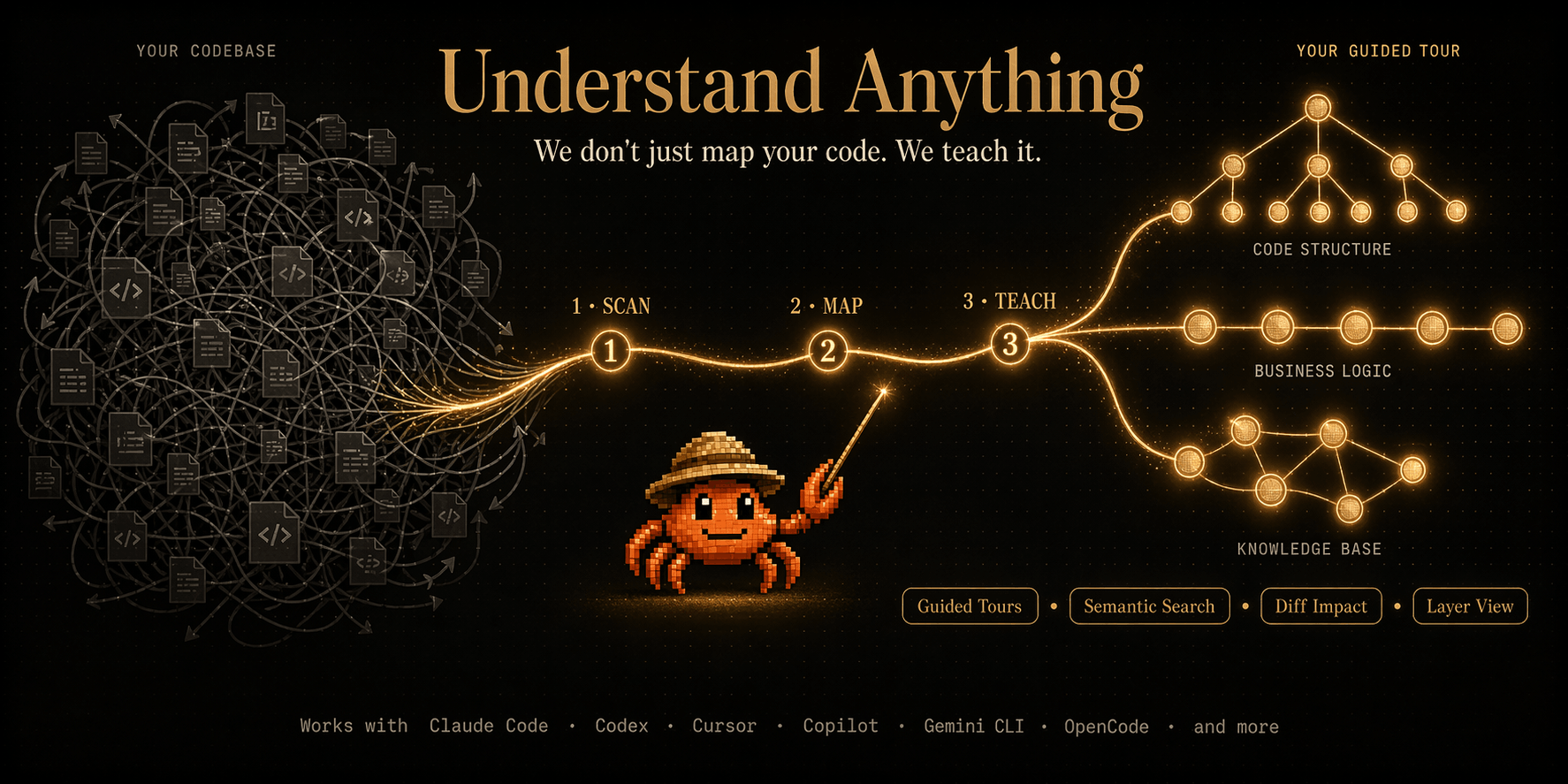
How is it different from a normal code Q&A?它和普通的代码问答有什么不同
The common practice is to throw a few files to the model, the model can not see the whole picture, the answer is often partially correct, the whole deviation.
It first does a full structure extraction, turning the project into a knowledge map with nodes and edges into a file, and then all questions are based on this real map, not the memory of the model.
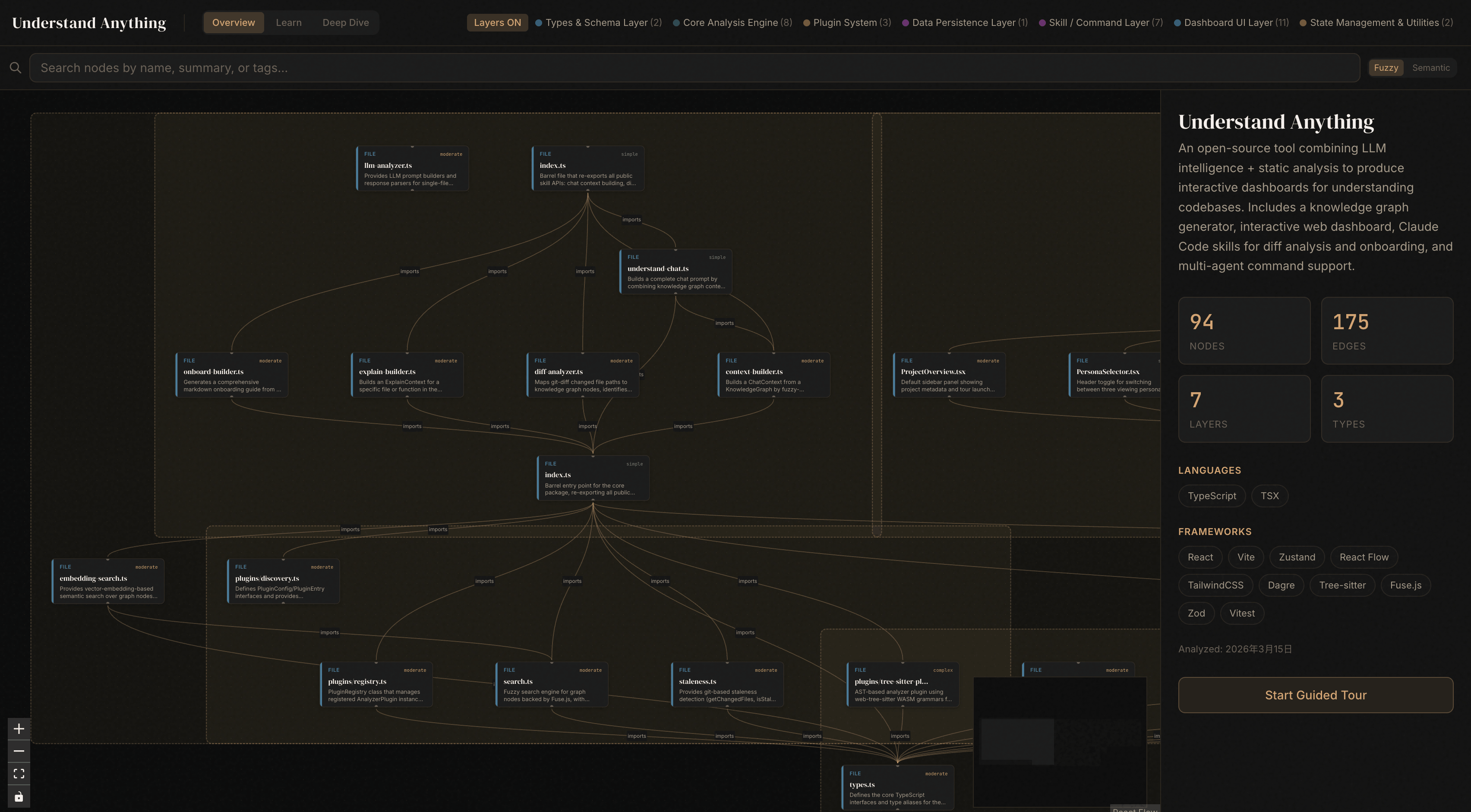
Graphs are hierarchically and automatically colored according to the architecture (interface layer, service layer, data layer, interface layer, tool layer), which can be searched and clicked. Click on any node to see the code, the association relationship, and a big vernacular explanation.
It also comes with a Guided Tour feature that automatically generates a reading route in dependency order, allowing you to understand the project in the correct order rather than getting lost from the entrance file.
普通做法是把几个文件丢给模型,模型看不到全局,回答往往局部正确、整体跑偏。
它先做一次全量结构抽取,把项目变成一张带节点与边的知识图谱落地成文件,之后所有提问都基于这张真实图谱,而不是模型的记忆。
图谱按架构分层自动着色(接口层、服务层、数据层、界面层、工具层),可以搜索、可以点击,点开任意节点能看到代码、关联关系与一段大白话解释。
还带「引导式导览」功能:按依赖顺序自动生成一条阅读路线,让你按正确顺序理解项目,而不是从入口文件一路迷路。
Key Competencies at a Glance主要能力一览
Fuzzy and semantic search: Find both by name and by meaning, and ask "Which part is responsible for authentication" can be directly located to the relevant node.
Change Impact Analysis: Before submitting, see which parts of the system will be affected by this change, and avoid pressing the hoist to float.
Layered visualization: Automatically grouped by API, Service, Data, UI, Utility, and color legend.
Explanation of language concepts: 12 types of programming modes such as generics, closures, decorators, etc., are explained in place at the specific location where they appear.
Business domain extraction and newcomer manual generation: extract domain concepts and processes from the code, and produce team onboarding documents with one click.
模糊与语义搜索:既按名字找,也按意思找,问「哪部分负责鉴权」能直接定位到相关节点。
改动影响分析:提交前先看这次改动会波及系统的哪些部分,避免按下葫芦浮起瓢。
分层可视化:自动按 API、Service、Data、UI、Utility 分组,并配颜色图例。
语言概念讲解:对泛型、闭包、装饰器等 12 类编程模式,在出现的具体位置就地解释。
业务域抽取与新人手册生成:从代码里提炼领域概念与流程,一键产出团队 onboarding 文档。
Supported Platforms支持的平台
Claude Code is installed as a native plugin; Codex, OpenCode, OpenClaw, Gemini CLI, Pi Agent, Vibe CLI, VS Code Copilot, Hermes, Cline, Kimi CLI, Trae, Nanobot, Kiro, etc. are accessed through a single line of installation scripts.
Different platforms have different call prefixes: most platforms use slash commands, while Codex uses dollar sign prefixes. If the prefix is not recognized, it is also possible to say “analyze this project with the understand skill” directly in natural language.
Output language switching is supported, Chinese can be selected during the first run, and the Knowledge Graph node description and Kanban interface will become Chinese.
Claude Code 里作为原生插件安装;Codex、OpenCode、OpenClaw、Gemini CLI、Pi Agent、Vibe CLI、VS Code Copilot、Hermes、Cline、Kimi CLI、Trae、Nanobot、Kiro 等则通过一行安装脚本接入。
不同平台的调用前缀不一样:多数平台用斜杠命令,而 Codex 要用美元符号前缀。如果前缀不被识别,直接用自然语言说「用 understand 技能分析这个项目」也可以。
支持输出语言切换,可在首次运行时选择中文,知识图谱节点描述与看板界面都会变成中文。
Installation and Instructions for Use安装与使用说明
The understand-anything-plugin directory in the compression package is the skill ontology. The install.sh and install.ps1 of the root directory correspond to the one-click installation of macOS/Linux and Windows, respectively.
Windows users can perform an official one-line command installation. The script will clone the repository to the user directory and create a soft link according to the selected platform. After installation, restart the IDE or CLI to take effect.
Initial analysis uses an understand command, which will write the diagram to the data directory within the project. The consumption of the first analysis token for large projects is high, so it is recommended to run it under the subscription package, or use the local model instead.
Subsequent runs are incremental by default, reanalyzing only the changed files with much less overhead; they can also be hung on the submit hook for automatic updates.
Kanban boards are opened with understand-dashboard; daily questions are asked with understand-chat, changes affect with understand-diff, and individual files are dug deep with understand-explain.
压缩包里的 understand-anything-plugin 目录就是技能本体,根目录的 install.sh 与 install.ps1 分别对应 macOS/Linux 与 Windows 的一键安装。
Windows 用户可执行官方一行命令安装,脚本会把仓库克隆到用户目录下并按所选平台创建软链接,装完重启 IDE 或 CLI 生效。
初始化分析用一次 understand 指令,会把图谱写到项目内的数据目录;大项目首次分析 token 消耗较高,建议在订阅套餐下运行,或改用本地模型。
后续运行默认是增量的,只重新分析改动过的文件,开销小得多;也可以挂在提交钩子上自动更新。
看板用 understand-dashboard 打开;日常提问用 understand-chat,改动影响用 understand-diff,单个文件深挖用 understand-explain。
Use reminder使用提醒
The token consumption of large warehouses may be considerable for the first full analysis. Please try running on small projects first to confirm that the cost is acceptable and then put it into the main warehouse. The generated atlas data will fall into the project directory. Remember to add it to the ignore list before submitting the code to avoid pushing the internal structure diagram to the public repository. This article is compiled from self-disclosed materials, and the resources are for learning and communication only. Please follow the project mit permission.
首次全量分析对大仓库的 token 消耗可能相当可观,请先在小项目上试跑,确认成本可接受再放到主力仓库。生成的图谱数据会落在项目目录内,提交代码前记得把它加进忽略清单,避免把内部结构图推到公开仓库。本文整理自公开资料,资源仅供学习交流,请遵循项目 MIT 许可。
⬇ Download · 点击下载:Understand Anything 技能包(含插件本体)(约 4.1 MB)
来自 GitHub 开源仓库 Egonex-AI/Understand-Anything 默认分支快照(MIT 许可),保留 understand-anything-plugin 技能本体、安装脚本与文档,已剔除体积较大的官网落地页资源
阅读与点赞数据保存在你的浏览器本地,欢迎留下你的想法。
 今日正能量学一点,用一点;今天种下的种子,会长成明天的能力。去免费下载专区 →广告
评论 文明发言,让讨论更有价值