video-shotcraft: A "motion design studio" skill with over 19,200 stars, which lets Claude Code turn screenshots of your real products into promotional videos with cinematic techniques and sound effects.video-shotcraft:19,200+ 星的「动态设计工作室」技能,让 Claude Code 把你的真实产品截图剪成带镜头语言和音效的宣传片
Say "Create a promotional video for my product" to Claude Code or Codex, and this skill developed by a Chinese author will take over the entire process: it will actually capture your page, select camera movements from 124 shot recipe cards, use Remotion to render the animation frame by frame, edit to the beat, add cinematic-quality sound effects, perform frame-by-frame quality checks, and finally deliver an MP4 that can still be further edited. It's not an AI video generator – every frame is drawn by code, so it's clear, on-brand, and fully editable. Since its launch, it has soared to over 19,200 stars, and even the export of CapCut drafts has been taken care of.
给 Claude Code 或 Codex 说一句「给我的产品做个宣传片」,这个中文作者开发的技能会接管全程:真实抓取你的页面、从 124 张镜头配方卡里挑运镜、用 Remotion 逐帧绘制动画、卡节拍剪辑、配电影级音效、逐帧质检,最后交付一条还能继续剪的 MP4。它不是 AI 视频生成器——每一帧都是代码画出来的,所以清晰、贴品牌、完全可编辑。上线以来冲到 19,200+ 星,连剪映草稿导出都做好了。
The fundamental difference between this and an AI video generator和 AI 视频生成器的本质区别
In the generated video, your product logo may be crooked, the text may be misspelled, and the interface may have extra buttons that don't belong there – the diffusion model is "imagining" your product. Video-Shotcraft does the opposite: it first captures screenshots of your actual pages using real tools, and all the visuals are drawn frame by frame based on these real materials. The product looks exactly as it does in reality.
The downside is that it doesn't produce a video with just one line of code: you need to install the Node.js environment to run Remotion, and rendering a video that lasts a few minutes takes anywhere from a few minutes to over ten minutes. In return, you get a finished video that is pixel-perfect, can be edited repeatedly, and can be processed through professional editing workflows.
Native Chinese is a hidden bonus: The author provides complete Chinese documentation and built-in CapCut draft export. In addition to the final video, you also get a project file that allows you to continue refining it in CapCut, which is almost unrivalled among similar skills.
生成的视频里,你的产品logo可能长歪、文案可能拼错、界面可能凭空多出按钮——扩散模型是在「想象」你的产品。video-shotcraft 反过来:先用真实工具抓取你的实际页面截图,所有画面基于这些真实素材逐帧绘制,产品长什么样就是什么样。
代价是它不是一句话出片:需要装 Node.js 环境跑 Remotion,渲染一条几分钟的视频要等几分钟到十几分钟。换来的是像素级清晰、可反复改、可进专业剪辑流程的成片。
中文原生是隐藏加分项:作者提供完整中文文档,且内置剪映草稿导出——成片之外还给你一个能在剪映里继续精修的工程文件,这在同类技能里几乎没有对手。
124 lens cards and a recipe library of 150 lenses124 张镜头卡与 150 个镜头的配方库
Following the major update in October, all 216 demo shots were refined and curated into 124 shot formula cards and 150 combinable shots: product card progressive assembly, spatial camera movement, exploded disassembly views, spotlight main cards, etc. Each formula comes with pre-adjusted parameters.
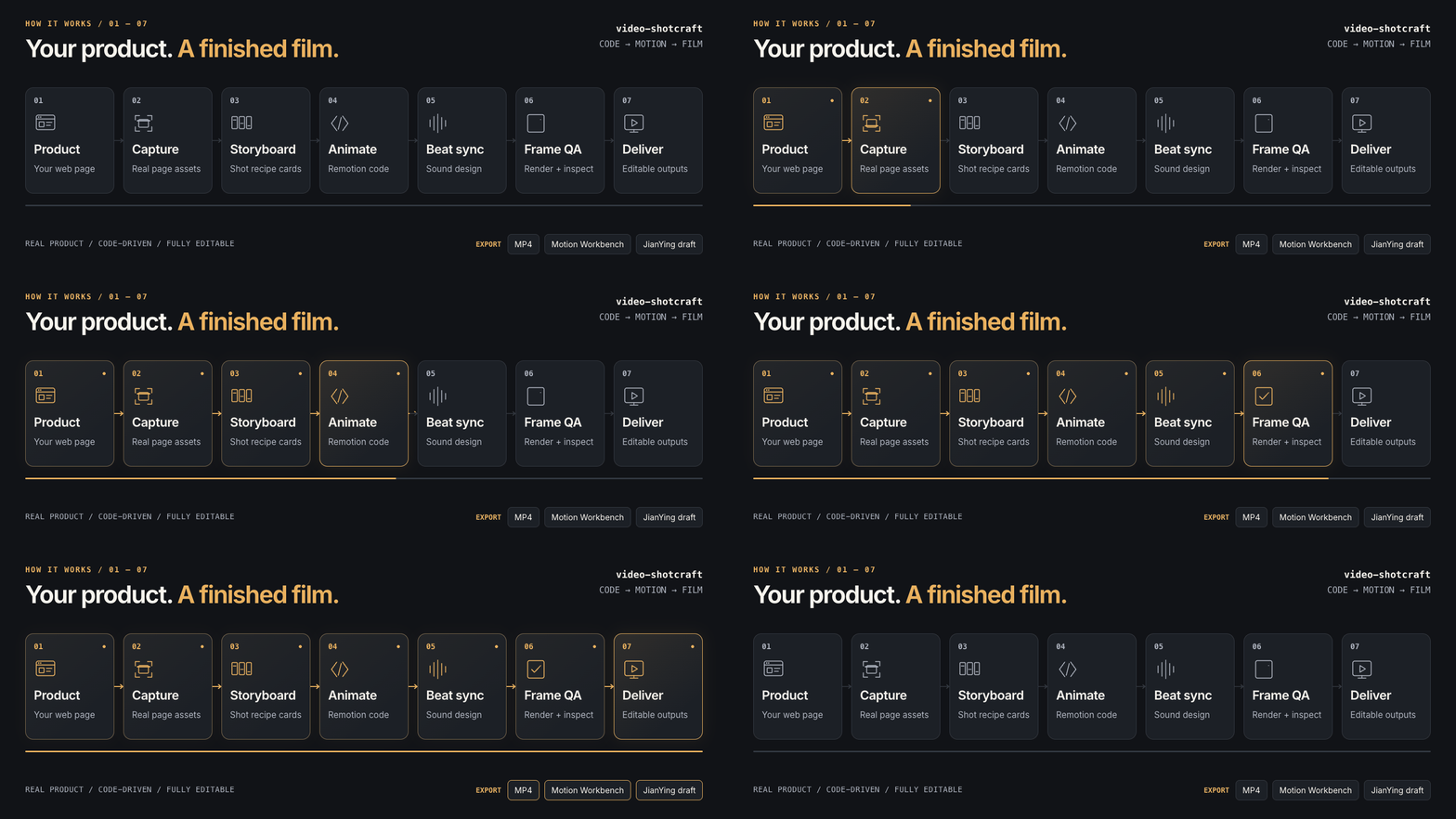
The workflow is a complete pipeline: Product → Real-world footage → Storyboarding with shot cards → Remotion animation → Beat-based editing and sound design → Frame-by-frame quality control → Delivery of MP4, dynamic workbench, and CapCut draft.
The official online Gallery provides real-time previews of all 150 lenses. Take a look around before installing them, and you'll have a good idea of which presets are suitable for your product type.
10 月的版本大更新后,216 个演示镜头全部打磨过一遍,精选成 124 张镜头配方卡、150 个可组合镜头:产品卡渐进组装、空间运镜、爆炸拆解视图、聚光灯主卡等,每个配方都带调好的参数。
工作流是完整流水线:产品 → 真实抓页 → 用镜头卡分镜 → Remotion 动画 → 卡节拍剪辑与声音设计 → 逐帧质检 → 交付 MP4、动态工作台和剪映草稿。
官方在线 Gallery 提供全部 150 个镜头的实时预览,装之前先逛一圈,心里就有数哪些配方适合你的产品类型。
Installation: Dual Support for Claude Code/Codex安装:Claude Code / Codex 双支持
Download the site's premium skill pack and unzip it (we have removed the 28MB demo assets, leaving only SKILL.md, the complete shot formula library, templates and workbench, reducing the size from 50MB to 9.7MB, with no loss of functionality).
Place the extracted video-shotcraft directory in ~/.claude/skills/ (Codex users should place it in ~/.agents/skills/). Navigate to the directory and run npm install to install the Remotion dependencies.
If you say to the Agent, "Use video-shotcraft to create a 30-second promotional video for my product page", it will capture the page, create storyboards, and render according to the process outlined in SKILL.md. For the first run, it is recommended to choose a simple page and produce a 15-second video to get a feel for the process.
下载本站精华技能包并解压(我们剔除了 28MB 演示素材,只保留 SKILL.md、全部镜头配方库、模板和工作台,从 50MB 瘦身到 9.7MB,功能不缺)。
把解压出的 video-shotcraft 目录放进 ~/.claude/skills/(Codex 用户放 ~/.agents/skills/),进入目录执行 npm install 安装 Remotion 依赖。
对 Agent 说「用 video-shotcraft 给我的产品页做一个 30 秒宣传片」,它会按 SKILL.md 里的流程抓页、分镜、渲染。第一次跑建议选个简单页面,先出一条 15 秒的短片感受流程。
Problem Encountered遇到问题
Rendering error: It's most likely that the Node version is too low or npm install hasn't finished running. Remotion requires Node 18+. Unable to capture the page: If the target site has anti-scraping measures, first manually take a screenshot and add it to the project, allowing the skill to use local assets directly. If you want to see all the shot effects, go to the official online Gallery. The skill pack that accompanies this article can be found via the download button above.
渲染报错:八成是 Node 版本过低或 npm install 没跑完,Remotion 需要 Node 18+;抓不到页面:目标站点有反爬时先手动截图放进项目,让技能直接用本地素材。想看全部镜头效果再去官方在线 Gallery。本文配套技能包见上方下载按钮。
⬇ Download · 点击下载:video-shotcraft 精华技能包(SKILL.md + 全套镜头配方库)
Apache-2.0 许可 · 剔除 28MB 演示素材的完整功能版 · 含 124 镜头卡 / 150 镜头 / 剪映导出
阅读与点赞数据保存在你的浏览器本地,欢迎留下你的想法。
 今日正能量学一点,用一点;今天种下的种子,会长成明天的能力。去免费下载专区 →广告
评论 文明发言,让讨论更有价值