Yoinks: Paste the link directly under the video in the terminal, 1,800 + sites are omnipresent, there is no pop-up window and no fake download buttonYoinks:在终端里粘贴链接直接下视频,1,800+ 站点通吃,没有弹窗也没有假下载按钮
The experience of finding a video download site is well known: the full-screen "Download Now" button is clicked on which is an advertisement. Yoinks (6,000 + stars, this week's GitHub trend list, mit permission) moved the matter back to the terminal - paste the link, choose the clarity (or only pull the mp3 track), enter, the file fell into the download directory, no pop-ups and no jumps throughout. The bottom layer is yt-dlp, which is supported by more than 1,800 sites such as YouTube, X/Twitter, Instagram, Threads, TikTok, etc. Node 18 + one command is installed.
找视频下载网站的经历大家都懂:满屏「立即下载」按钮点哪个都是广告。Yoinks(6,000+ 星,本周 GitHub 趋势榜,MIT 许可)把这件事搬回终端——粘贴链接、选清晰度(或只抽 mp3 音轨)、回车,文件落进下载目录,全程无弹窗无跳转。底层是 yt-dlp,YouTube、X/Twitter、Instagram、Threads、TikTok 等 1,800 多个站点都支持,Node 18+ 一个命令装好。
What it's like to use it用起来是什么体验
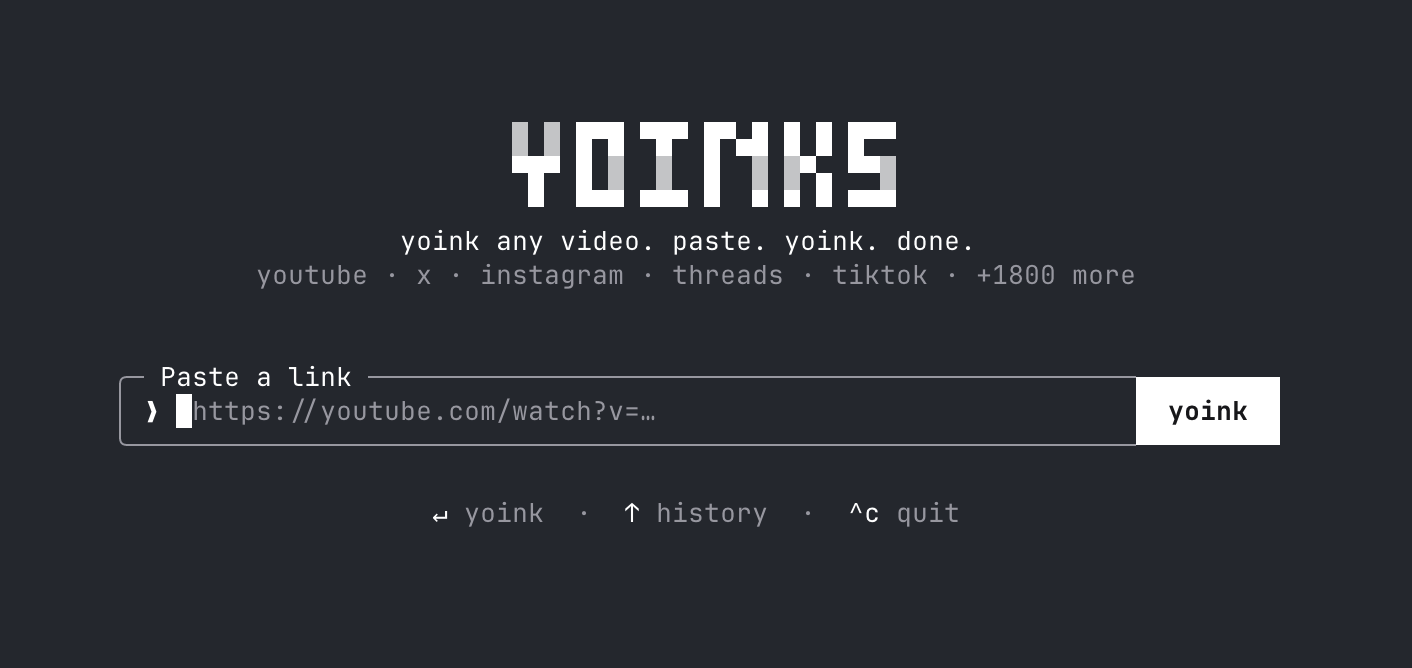
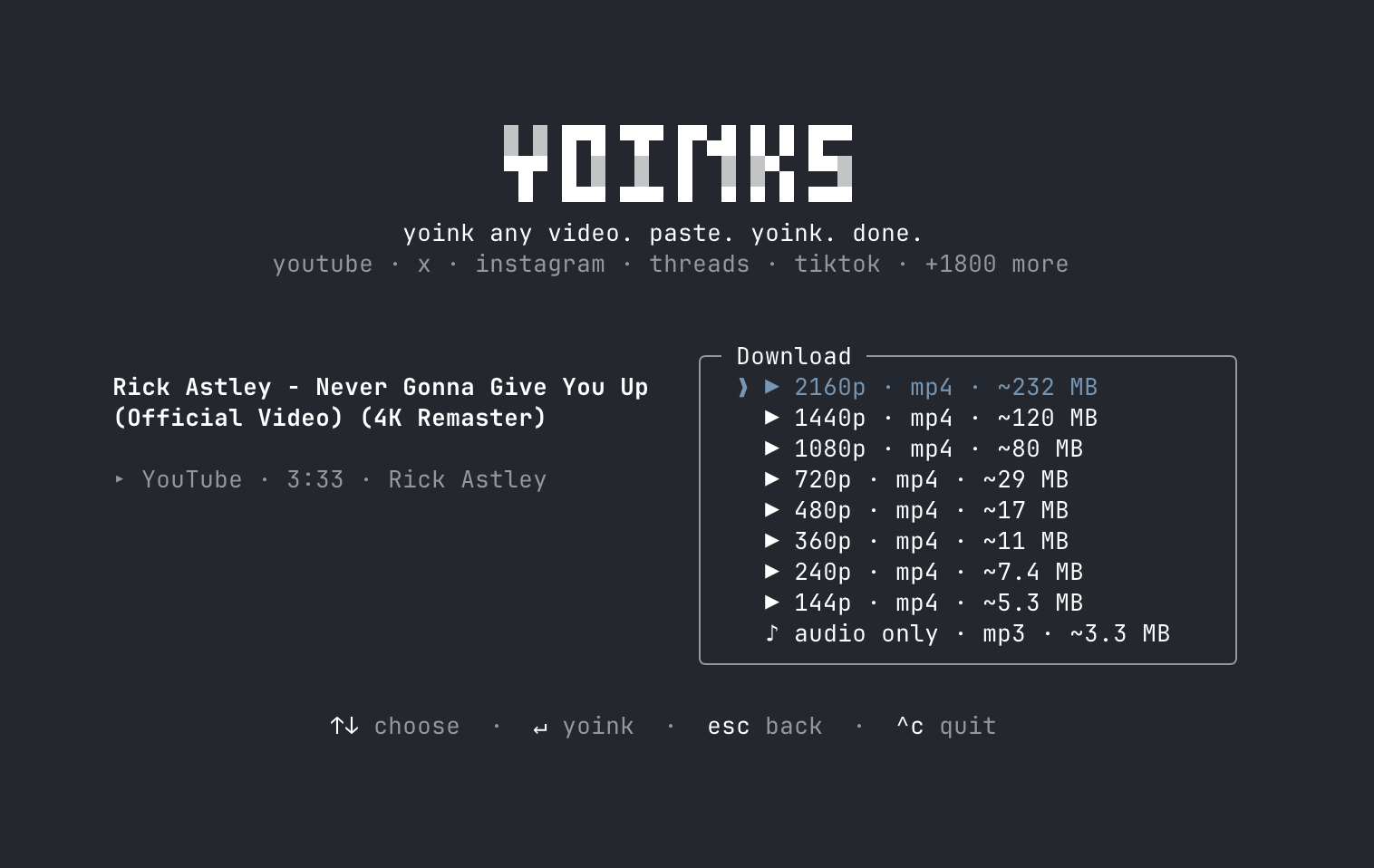
It takes over the entire terminal to make a full-screen interface: an input box on the home page, paste the link to enter, and immediately pop up the format selector - each resolution is marked with an estimated file size, and there is a separate "audio only mp3" option.
Select the format of the arrow keys (or j/k, numeric keys), and enter to drive down; esc to return, Ctrl-C to exit. The entire interface supports mouse clicks: download button, format list, footer shortcut key prompts can be clicked, click the logo to return to the homepage.
The theme automatically follows your terminal color scheme (auto/light/dark third gear, Ctrl-T switch). The downloaded file path will be printed directly in the terminal, and saved to ~/Downloads by default.
它接管整个终端做全屏界面:主页一个输入框,粘贴链接回车,马上弹出格式选择器——每档分辨率标着预估文件大小,还有单独的「仅音频 mp3」选项。
方向键(或 j/k、数字键)选格式,回车开下;esc 返回、Ctrl-C 退出。整套界面支持鼠标点击:下载按钮、格式列表、页脚快捷键提示都能点,点 Logo 回主页。
主题自动跟随你的终端配色(auto/light/dark 三档,Ctrl-T 切换),下载完成的文件路径会直接打印在终端里,默认存到 ~/Downloads。
The Underlying Mechanism: Why It's So Stable底层机制:为什么它这么稳
The core is yt-dlp: yoinks will automatically download the independent yt-dlp executable to ~/.yoinks/bin when it runs for the first time. You do not need to install Python; you can reuse your yt-dlp directly if you already have it on your computer.
Merging high-resolution streams and extracting mp3s requires ffmpeg: find the path of the system first, and then use the built-in ffmpeg-static pocket base and zero configuration.
The interface is built with Ink (React in the terminal), which is why it makes a clickable, full-screen centered “unlike a command-line tool” experience.
核心是 yt-dlp:首次运行时 yoinks 会自动把独立的 yt-dlp 可执行文件下到 ~/.yoinks/bin,不需要你装 Python;本机已有 yt-dlp 就直接复用你的。
合并高分辨率流和抽取 mp3 需要 ffmpeg:优先找系统 PATH 里的,没有就用内置的 ffmpeg-static 兜底,零配置。
界面用 Ink(终端里的 React)构建,这正是它能做出可点击、全屏居中这种「不像命令行工具」的体验的原因。
Installation: one command安装:一条命令
npm install -g yoinks is installed globally; if you want to try it first, you can run npx yoinks directly.
The following three uses: yoinks direct format selector; naked yoinks paste into the interactive interface; --theme light can force the specification of the starting theme.
Requires Node 18 or later, with all remaining dependencies (yt-dlp, ffmpeg) prepared automatically.
npm install -g yoinks 全局安装;想先试试不装,直接 npx yoinks 也能跑。
之后三种用法:yoinks <链接> 直达格式选择器;裸敲 yoinks 进交互界面粘贴;--theme light 可强制指定起始主题。
要求 Node 18 或更高版本,其余依赖(yt-dlp、ffmpeg)全部自动准备。
Download instructions下载说明
The download button provides the Yoinks v0.3.1 official npm package (tgz, 17KB), which can be unzipped offline to review the source code, or npm install -g to complete the installation.
Be careful to follow the terms of service and copyright rules of each platform, and only download content that you have the right to save.
下载按钮提供 Yoinks v0.3.1 官方 npm 包(tgz,17KB),可离线解压审阅源码,或 npm install -g 该包完成安装。
注意遵守各平台服务条款与版权规则,仅下载你有权保存的内容。
Use reminder使用提醒
This article is compiled from public sources and ships with the matching resource. Product features and pricing are subject to the official page. Resources are for learning and exchange only — please respect the original license.
本文整理自公开资料并附上配套资源;涉及产品的功能与价格以官方页面为准。资源仅供学习交流,请遵循来源许可。
⬇ Download · 点击下载:Yoinks v0.3.1 官方 npm 包(17KB)
取自 npm registry 官方包 yoinks@0.3.1,MIT 许可,npm install -g 即装即用。
阅读与点赞数据保存在你的浏览器本地,欢迎留下你的想法。
 今日正能量学一点,用一点;今天种下的种子,会长成明天的能力。去免费下载专区 →广告
评论 文明发言,让讨论更有价值